Did you know that 93% of shoppers use a discount code or coupon at least once a year? Over 60% actively seek out deals before purchasing. Coupons are more than just a nice perk. They’re a powerful driver of sales and customer loyalty.
For WooCommerce store owners, leveraging coupons strategically can lead to higher conversion rates and repeat purchases. But what happens when you need to generate multiple coupons in WooCommerce? What if you need hundreds or thousands of coupons for a large-scale promotion?
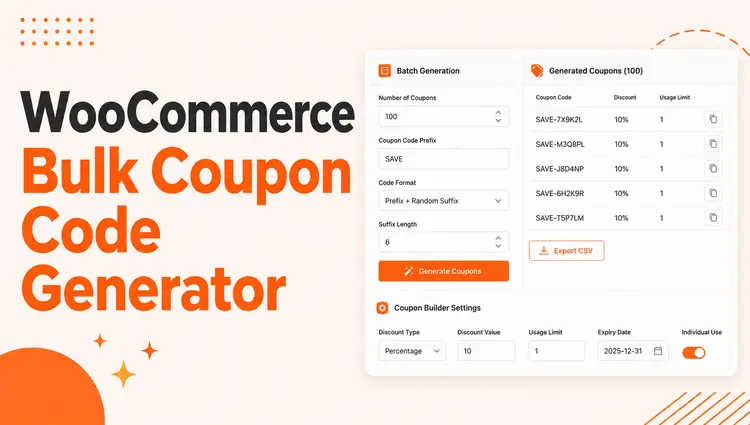
Enter Bulk Coupon Code Generator in WooCommerce is a dynamic feature that allows you to create multiple coupons in just a few clicks. Whether you’re gearing up for a holiday sale or rewarding loyal customers, this bulk coupon generation saves you time and ensures your campaigns run smoothly.
In this comprehensive guide, we’ll show you how to use the Bulk Coupon Code Generator in WooCommerce. You’ll unlock new ways to boost your WooCommerce store’s success.
Table of Contents
What You’ll Learn in This Guide
- Learn how WooCommerce bulk coupon plugin helps store owners save time by creating multiple coupon codes at once.
- Discover how to use coupons for seasonal promotions, customer retention, and new product launches to boost sales.
- Understand how to personalize coupon codes for specific customer groups, locations, or product categories.
- Get insights into how to use bulk discounts strategically without harming your profit margins.
- Learn how to set clear restrictions and usage limits to prevent coupon misuse and protect your business.
- Find out how to track, analyze, and optimize coupon campaigns for better results.
- Get practical advice on overcoming common issues.
What are Coupons in WooCommerce?
Coupons in WooCommerce are not just random discounts. In WooCommerce, coupons are a powerful marketing tool that allows store owners to offer discounts or incentives to their customers.
Customers can apply codes or offers during checkout to receive a specific benefit. These benefits include percentage discounts, fixed amount off, free shipping, or other promotional perks.
By offering enticing WooCommerce discounts, you can:
- Encourage repeat purchases to build a loyal customer base.
- Incentivize shoppers to complete their orders, reducing abandoned carts.
- Stand out from competitors by offering exclusive deals, including unique coupon codes and seasonal promotions.
Adding coupons strategically can transform casual visitors into long-term customers while increasing your sales figures.
Why Bulk Coupon Code Generator in WooCommerce Matters?
When managing a WooCommerce store, creating multiple coupon codes by hand can be a huge time sink. Streamlining the process becomes even more crucial during high-demand periods. These include sales events or promotions. Here’s how bulk coupon generation can make a big difference. We’ll show real-life examples of how it can benefit your store:
Time-Saving for Store Owners
Imagine you’re running a limited-time offer for Black Friday. You must create hundreds of WooCommerce coupon codes to offer a 20% or More discount across different categories. Manually inputting each coupon could take hours, if not days.
Instead of typing out 200 different discount coupon codes, a Bulk Coupon Code Generator in WooCommerce lets you generate 200 codes in a minute. Each has a unique identifier, such as CODE2025BLACKFRIDAY. The time saved allows you to focus on marketing strategies. You can also focus on customer engagement during the sale.
Managing Seasonal Sales and Promotions
Seasonal sales are vital for driving revenue. But they come with their own set of challenges. You may need to create a set of unique coupon codes for Christmas. You’ll need another for New Year’s, and a different one for mid-season clearance. Bulk coupon generation allows you to plan ahead and create all these codes in one go.
Let’s say you’re offering a “Buy One, Get One Free” promotion for a limited time. Instead of manually creating each coupon and assigning it to products, you can set the rules in the bulk generator. This creates a code for each item in your catalog. You won’t worry about missing any.
Marketing Campaign Efficiency
With the need to distribute coupons across various platforms, bulk coupon generation helps ensure consistency. All customers get the intended offers, no matter how they interact with your store.
Whether you’re sending out an email campaign to subscribers, having pre-generated WooCommerce coupon codes saves time and ensures consistency. Similarly, sharing exclusive deals on social media becomes more efficient and professional when you use pre-generated coupon codes.
You could create a series of bulk coupons targeted at different segments of your audience. For instance, 10% off for email subscribers, 15% off for Instagram followers, and a special 20% off for VIP customers. All these coupons can be created in one go and then distributed through the proper channels. This makes your campaigns more effective.
Scalability
As your store grows, so does the number of promotions you need to run. Whether for a significant sale event, product launch, or a customer loyalty program, bulk discount tools allow you to manage promotions across your entire catalog without extra effort. You can create discounts for hundreds or thousands of products with just a few clicks. This saves you from repeating the process for each product.
For example, if you have a large inventory with many categories and products, bulk discount tools allow you to create a universal discount. You could offer 20% off all items in the “Spring Collection” and apply it across the board in seconds. This is much more efficient than manually adding discounts to each product individually.
Customization
Bulk coupon generation doesn’t just help with quantity. It can also help with customization. For example, you can create discounts tailored to specific customer groups. You can even offer personalized coupons for targeted promotions.
Whether you’re running a flash sale for new customers or offering an exclusive coupon to loyal buyers, customization allows you to fine-tune your discounts. You can target the exact audience you want to reach.
Error Minimization
When you manually create WooCommerce coupon codes, there’s always the risk of typos, expired codes, or incorrect discount values. These errors can lead to frustrated customers and lost sales. Bulk coupon generation reduces this risk by automating the entire process. This ensures every code is correct and functioning as intended.
ShopLentor- WooCommerce Builder for Elementor & Gutenberg
A versatile page builder to build modern and excellent online stores with more than 100k+ Active Installations.
How to Choose the Right WooCommerce Bulk Coupon Plugin
Selecting the best WooCommerce bulk coupon plugins 2025 requires careful consideration of your store’s needs. Here are key factors to evaluate:
Essential Features to Look For:
- Code Generation Options: Look for plugins that offer customizable prefixes, suffixes, and unique code formats. Mass creation of discount codes in WooCommerce functionality should include bulk generation limits.
- Advanced Restrictions: The plugin should allow you to set usage limits, expiration dates, and customer-specific restrictions. Geographic limitations and product-specific rules are also important.
- Integration Capabilities: Choose plugins that integrate well with email marketing tools, analytics platforms, and other WooCommerce extensions.
- Performance Impact: Ensure the plugin doesn’t slow down your website. Check reviews for performance feedback from other store owners.
Popular Options Available:
While several plugins exist, ShopLentor stands out for its comprehensive features and user-friendly interface. Other alternatives include Smart Coupons, Advanced Coupons, and YITH WooCommerce Coupon Email System.
Bulk Coupon Code Generator in WooCommerce: Step-by-Step Guide
There are numerous WooCommerce bulk coupon plugins available for generating bulk coupons. Each offers different features and capabilities. However, ShopLentor stands out for its seamless integration, ease of use, and advanced options. These features make it an excellent Bulk Coupon Code Generator in WooCommerce.
Whether you’re running seasonal promotions or focusing on specific customer groups, ShopLentor’s Advanced Coupon module makes generating bulk coupons easy. It’s a simple and efficient solution, making it a great choice for WooCommerce store owners.
Let me walk you through how to create hundreds of coupons in WooCommerce with ShopLentor’s Advanced Coupon module! This feature is super helpful when you need to create multiple coupons at once for your promotional campaigns.
Before we start, you’ll need to have ShopLentor installed on your WordPress website. If you don’t have it yet, you’ll need to get that set up first.
Step 1: Enable the Advanced Coupon Module

After activating ShopLentor, head over to your WordPress dashboard and find the ShopLentor Settings. Click on the Modules tab and look for the Advanced Coupon option. Now, toggle the Advanced Coupon option to “Enable.”
Step 2: Creating Your Coupons
Now it’s time to create your coupons! Start by navigating to the left-hand menu in your WooCommerce dashboard and clicking on Marketing. From there, select Coupons to access the coupon management area.
Scroll down until you find the Bulk Coupon Generate section.
With just a few steps, you’ll be ready to create multiple coupons at once. This saves time and sets the stage for your next big promotion.
Step 3: Setting Up Your WooCommerce Promotional Codes Generator
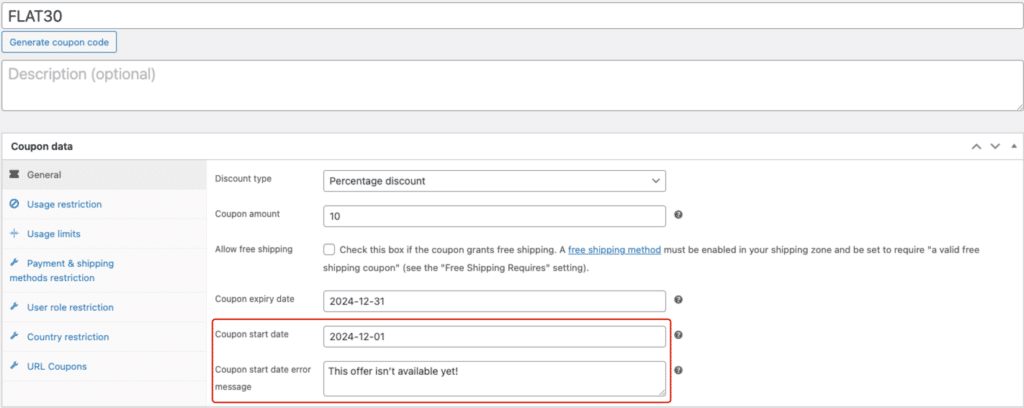
Here’s where you can get really strategic with your coupons. ShopLentor gives you some great options to make your coupons work exactly how you want:
Number of Coupons:
- Find the box that says “Generate Number of Coupons”
- Type in how many you want (like “20” if you need 20 coupons)
Making Your Coupon Codes Look Nice:
1. Want all your coupons to start with something specific? Use the “Coupon Prefix” box
Example: Type “SALE-” to get coupons like “SALE-12345”.
2. Want something at the end? Use the “Coupon Suffix” box
Example: Type “-2025” to get “SALE-12345-2025”.
Quick Tip: Don’t use any spaces in your prefix or suffix!
Step 4: Advanced Configuration Settings
You can make your coupons even smarter with these advanced settings:
Date and Time Controls:
- Set a start date (perfect for planned sales!)
- Choose expiration dates to create urgency
- Schedule automatic activation for future campaigns
Geographic and Shipping Restrictions:
- Choose which countries can use them
- Pick which shipping methods work with them
- Set minimum order amounts for activation
Customer Targeting Options:
- Decide who can use them (like only VIP customers)
- Set usage limits per customer
- Create exclusive codes for specific user roles
Step 5: Finishing Up
Don’t forget to hit that Publish or Update button after you’ve set everything up! This makes all your settings go live. Click it to save all your work.
Need to check or update your coupons later? No worries! Simply head back to Marketing > Coupons in your WooCommerce dashboard. Here, you’ll find a complete list of all your created coupons.
Whether you want to make edits, adjust settings, or review their performance, everything is right at your fingertips for easy management.
Alternative WooCommerce Bulk Coupon Solutions
While ShopLentor is excellent, other WooCommerce bulk coupon plugins offer different features. Here are popular alternatives:
Smart Coupons for WooCommerce:
This plugin offers advanced bulk generation features. It includes gift cards, store credits, and automatic coupon application. Smart Coupons excels at creating personalized discount experiences.
Advanced Coupons:
This solution provides sophisticated restriction options and BOGO deals. It includes URL coupons and cart abandonment recovery features. Advanced Coupons works well for complex promotional strategies.
YITH WooCommerce Coupon Email System:
This plugin focuses on email-based coupon distribution. It automatically sends personalized coupons to customers. YITH excels at customer retention campaigns.
Choosing the Right Alternative:
Consider your budget, required features, and technical expertise. Free plugins offer basic functionality, while premium options provide advanced features and support.
Advanced Settings and Security Features
Protecting your WooCommerce coupon automation requires implementing proper security measures. Here’s how to safeguard your promotional campaigns:
Security Best Practices
- Unique Code Generation: Always use unique, unpredictable coupon codes. Avoid sequential numbers or easily guessable patterns. Include random letters and numbers in your code.
- Usage Monitoring: Regularly check coupon usage patterns for suspicious activity. Set up alerts for unusual redemption spikes. Monitor IP addresses for potential fraud.
- Access Controls: Limit who can create and manage bulk coupons. Use role-based permissions to restrict access. Keep detailed logs of coupon creation and modifications.
Advanced Restriction Options:
- Time-Based Limits: Set specific hours or days when coupons can be used. Create flash sale windows with precise timing. Implement countdown timers for urgency.
- Product-Specific Rules: Restrict coupons to specific categories or individual products. Exclude sale items from additional discounts. Create bundle-specific promotions.
- Customer Segmentation: Target coupons based on purchase history or customer lifetime value. Create VIP-only discount codes. Segment by geographic location or demographics.
Tracking and Analytics for Coupon Performance
Monitoring your WooCommerce coupon automation success requires proper tracking and analysis. Here’s how to measure and optimize your campaigns:
Key Metrics to Track:
- Redemption Rates: Monitor what percentage of generated coupons get used. Low redemption rates may indicate poor targeting or unappealing offers.
- Revenue Impact: Track total revenue generated from coupon campaigns. Calculate the return on investment for each promotional effort.
- Customer Acquisition: Measure how many new customers coupons bring to your store. Track long-term value of coupon-acquired customers.
Analytics Tools Integration:
- Google Analytics Setup: Configure goal tracking for coupon usage. Set up conversion funnels to understand customer behavior. Monitor traffic sources that respond best to coupons.
- WooCommerce Reports: Use built-in reporting to analyze coupon performance. Export data for detailed analysis in spreadsheet applications.
- Third-Party Tools: Consider integrating with advanced analytics platforms. Tools like Hotjar or Crazy Egg show how customers interact with coupon forms.
Optimization Strategies:
- A/B Testing: Test different discount percentages and coupon formats. Compare email subject lines and promotional messaging. Test various expiration date lengths.
- Seasonal Analysis: Identify which times of year perform best for coupons. Plan campaigns around high-performing periods. Adjust strategies based on seasonal trends.
Best Practices for Bulk Coupon Code Generator in WooCommerce
Maximize the effectiveness of your Bulk Coupon Code Generator in WooCommerce by following these simple yet impactful practices:
- Avoid Overusing Discounts: Use the bulk coupon feature wisely to maintain profit margins. Save discounts for special events or loyal customers.
- Set Clear Rules: Prevent misuse by adding rules like product restrictions, usage limits, and expiration dates.
- Track Campaign Performance: Monitor each WooCommerce coupon’s redemption rates and adjust your strategies to boost results.
- Test Before Launch: Test your coupon feature to ensure proper functionality, from discounts to usage limits.
- Use Unique Codes: Assign unique WooCommerce coupon codes with prefixes or suffixes for better tracking and fraud prevention.
Additional Best Practices:
- Plan Campaign Timing: Schedule coupon releases during peak shopping times. Coordinate with marketing campaigns and product launches.
- Create Urgency: Use limited-time offers to encourage quick action. Set reasonable expiration dates to create urgency without frustrating customers.
- Segment Your Audience: Create different coupon types for different customer groups. Tailor offers based on purchase history and preferences.
Common Challenges and Troubleshooting
Even with the convenience of the Bulk Coupon Code Generator in WooCommerce, store owners can encounter a few challenges. Here’s a look at some common issues and practical solutions to ensure your coupon campaigns run smoothly.
Technical Issues and Solutions
1. Plugin Conflicts: The WooCommerce bulk coupon plugin can sometimes cause hiccups in the coupon generator due to conflicts. Ensure all your WooCommerce plugins are up to date and properly configured to avoid disruptions.
Solution: Temporarily deactivate other plugins to identify conflicts. Update all plugins to their latest versions. Contact plugin support for compatibility issues.
2. Server Performance: Large bulk generations can strain server resources. This may cause timeouts or incomplete coupon creation.
Solution: Generate coupons in smaller batches (1,000-5,000 at a time). Increase server timeout limits if possible. Consider upgrading hosting for better performance.
Coupon Misuse Prevention
1. Unauthorized Usage: Unauthorized usage of coupons can be a problem. Set usage limits, such as restricting the number of redemptions per customer or per order, to protect your margins.
Solution: Implement strict usage limits and customer restrictions. Monitor unusual usage patterns regularly. Use unique codes that are difficult to guess.
2. Code Sharing: Customers may share exclusive coupon codes on deal-sharing websites.
Solution: Create single-use codes for sensitive promotions. Implement customer account restrictions for exclusive offers. Monitor deal-sharing sites for leaked codes.
Campaign Performance Issues
1. Ineffective Campaigns: Not all campaigns perform as expected. If your bulk discount campaign isn’t hitting the mark, analyze the data and adjust accordingly. Consider discount values, expiration dates, or target audience for better results.
Solution: Analyze redemption data to identify patterns. Survey customers about their coupon preferences. Test different discount amounts and formats.
2. Low Redemption Rates: Generated coupons may not be used as frequently as expected.
Solution: Improve coupon visibility in marketing materials. Simplify the redemption process. Create more compelling offers or longer expiration periods.
ShopLentor- WooCommerce Builder for Elementor & Gutenberg
A versatile page builder to build modern and excellent online stores with more than 100k+ Active Installations.
Frequently Asked Questions
Why should I use Bulk Coupon Code Generator in WooCommerce?
The Bulk Coupon Code Generator in WooCommerce saves time by automating coupon creation. This enables store owners to focus on marketing. It’s perfect for running campaigns like Black Friday sales, customer loyalty rewards, or affiliate programs. Unique codes also help track performance and prevent misuse.
Can I customize coupons when using Bulk Coupon Code Generator in WooCommerce?
Yes, most plugins with Bulk Coupon Code Generator in WooCommerce functionality allow extensive customization options. These include adding prefixes or suffixes to coupon codes, setting usage limits, and applying restrictions. You can restrict by user roles, payment methods, or locations. This helps create tailored discounts for your audience.
What is the maximum number of coupons I can generate with WooCommerce bulk coupon plugin?
WooCommerce allows you to generate thousands of unique coupon codes in bulk. The exact limit depends on your server resources and hosting capabilities.
For optimal performance, it’s recommended to generate batches of 1,000-5,000 coupons at a time. This prevents timeout issues or server strain.
How do I prevent coupon misuse with Bulk Coupon Code Generator in WooCommerce?
You can prevent coupon misuse with the Bulk Coupon Code Generator in WooCommerce by setting clear usage limits and using unique coupon codes. Apply restrictions based on user roles, locations, or purchase conditions. Monitor usage patterns regularly for suspicious activity.
What are the best practices for WooCommerce bulk coupon plugins?
When generating bulk coupons:
1. Use meaningful prefixes for easy tracking
2. Set appropriate expiration dates
3. Implement usage limits per customer
4. Maintain proper documentation
Always test a few coupons before mass distribution. Regularly monitor usage patterns to prevent abuse or overlapping promotions.
Can I integrate bulk coupon generation with email marketing?
Yes, most modern WooCommerce bulk coupon plugins offer email integration features. You can automatically send generated coupons to customer segments. Integration with platforms like Mailchimp and Constant Contact is common.
Are there free WooCommerce bulk coupon plugins available?
Several free plugins offer basic bulk coupon generation features. However, premium plugins provide advanced features like detailed analytics, advanced restrictions, and priority support. Consider your budget and required features when choosing.
Conclusion
The Bulk Coupon Code Generator in WooCommerce is a game-changer for streamlining your store’s discount strategies.
By automating the process, you save time, reduce errors, and create targeted campaigns. These campaigns boost sales and customer engagement.
Whether you’re running seasonal promotions or rewarding loyal customers, the Bulk Coupon Code Generator in WooCommerce helps you manage coupons efficiently and effectively.
Why spend hours creating individual coupons when you can use the Bulk Coupon Code Generator in WooCommerce in a few clicks? Ready to streamline your discount campaigns? Get started with the Bulk Coupon Code Generator in WooCommerce today!