Cart abandonment is a major challenge that affects nearly every online store. Research consistently shows that approximately 70% of potential customers add items to their shopping cart but leave without completing their purchase. This represents a significant loss of potential revenue for e-commerce businesses.
However, there’s a proven solution to this problem: learning how to add abandoned cart email template systems to your WordPress site. These automated email reminders can help recover a substantial portion of lost sales by gently nudging customers to return and complete their purchases.
Table of Contents
Key Takeaways
Before diving into the implementation process, here are the essential insights you’ll gain from this guide:
- Set up automated WooCommerce abandoned cart emails easily
- Create personalized abandoned cart email templates effectively
- Configure timing rules for maximum cart recovery
- Design compelling abandoned cart email examples professionally
- Track and optimize your email campaign performance
- Implement best practices for higher conversion rates
What Are Abandoned Cart Email Templates?
When customers leave your WooCommerce store without completing their purchase, abandoned cart email templates serve as your digital sales recovery team. These are pre-designed, automated messages that are sent to customers who have added items to their shopping cart but left your website without completing the checkout process.
Abandoned cart email templates serve as friendly reminders that encourage customers to return and finish their purchase. The effectiveness of these WooCommerce abandoned cart emails is remarkable – studies show that these emails have an average open rate of 45% and can recover 10-15% of otherwise lost sales.
This impressive performance makes them one of the most valuable tools in any e-commerce marketing strategy. For deeper insights into the scope of this challenge, WooCommerce Abandoned Cart Statistics reveal compelling data about customer behavior patterns.
Why Abandoned Cart Email Templates Matter for WooCommerce Stores
Implementing a robust WooCommerce abandoned cart email strategy offers numerous benefits that directly impact your bottom line and customer relationships.
- Revenue Recovery: The primary benefit is obvious – you can recover sales that would otherwise be completely lost. Even recovering just 10% of abandoned carts can significantly impact your bottom line, especially when you consider the volume of daily abandonments.
- Customer Re-engagement: These WooCommerce abandoned cart emails provide an opportunity to re-engage with potential customers who have already shown interest in your products, keeping your brand top-of-mind.
- Automated Process: Once you set up your abandoned cart email template WooCommerce system, it works automatically, saving you time while continuously working to recover lost sales without manual intervention.
- Personalization Opportunities: Modern abandon cart email design allows you to create personalized experiences by including the specific items customers left behind, making the emails more relevant and compelling.
- Low Cost, High ROI: Compared to other marketing strategies, abandoned cart emails are relatively inexpensive to implement but can provide exceptional returns on investment, making them essential for any WooCommerce store.
How to Add Abandoned Cart Email Templates
Understanding how to add abandoned cart email template functionality to your WordPress site is crucial for maximizing your e-commerce potential. Setting up these templates requires the right approach and tools to ensure maximum effectiveness.
While WordPress itself doesn’t have built-in abandoned cart functionality, there are several proven methods to implement this crucial feature for your WooCommerce store.
Method 1: Using WooCommerce Abandoned Cart Plugins
If you’re running a WooCommerce store, dedicated WooCommerce abandoned cart plugins offer the most seamless integration. These specialized tools are designed specifically for WooCommerce environments and provide comprehensive abandoned cart functionality with minimal setup requirements.
Method 2: Email Marketing Platforms
Many email marketing services offer abandoned cart features that can be integrated with WordPress sites. These platforms typically require some technical setup but offer robust tracking and analytics for your abandoned cart email campaigns.
Method 3: Dedicated WordPress Plugins
Several WordPress plugins are specifically designed to handle abandoned cart recovery. These solutions often provide the most seamless integration with your WordPress site and offer user-friendly interfaces for creating abandoned cart email examples.
Adding Abandoned Cart Email Templates with ShopLentor
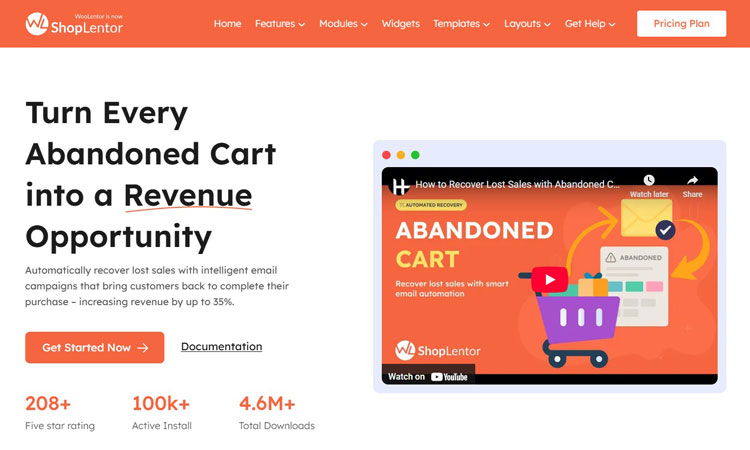
One of the most effective and user-friendly solutions for WordPress users is ShopLentor’s Abandoned Cart Recovery module. This powerful WooCommerce abandoned cart plugin makes the process of setting up abandoned cart email templates straightforward and accessible, even for users without technical expertise.
ShopLentor provides a comprehensive abandoned cart recovery system that integrates perfectly with WooCommerce stores. The best part about this WooCommerce abandoned cart email solution? The setup process is remarkably easy to understand and implement, requiring no coding knowledge or complex configurations.
How to Add WooCommerce Abandoned Cart Email Templates
Creating effective abandoned cart email templates requires a systematic approach that covers all essential elements of a successful recovery campaign.
Step 1: Access the ShopLentor Settings
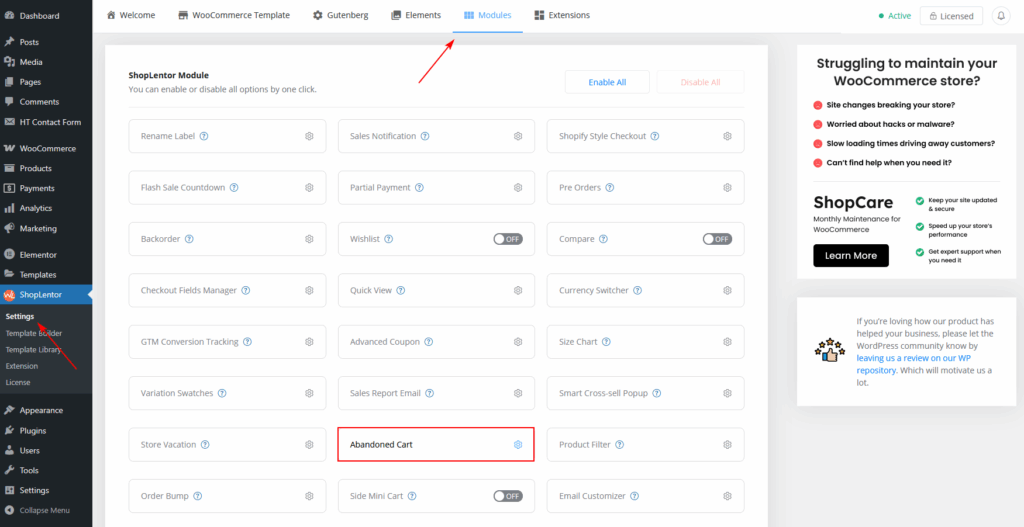
First, navigate to your WordPress dashboard and go to ShopLentor > Settings > Modules > Abandoned Cart. This will take you to the main abandoned cart interface, where you can manage all aspects of your cart recovery campaign.
The interface is organized into four main tabs:
- Settings (for general configuration)
- Email Templates (for creating and managing your abandoned cart email design)
- Abandoned Carts (for viewing and managing abandoned cart data)
- Analytics (for tracking performance)
Step 2: Enable the Abandoned Cart Module
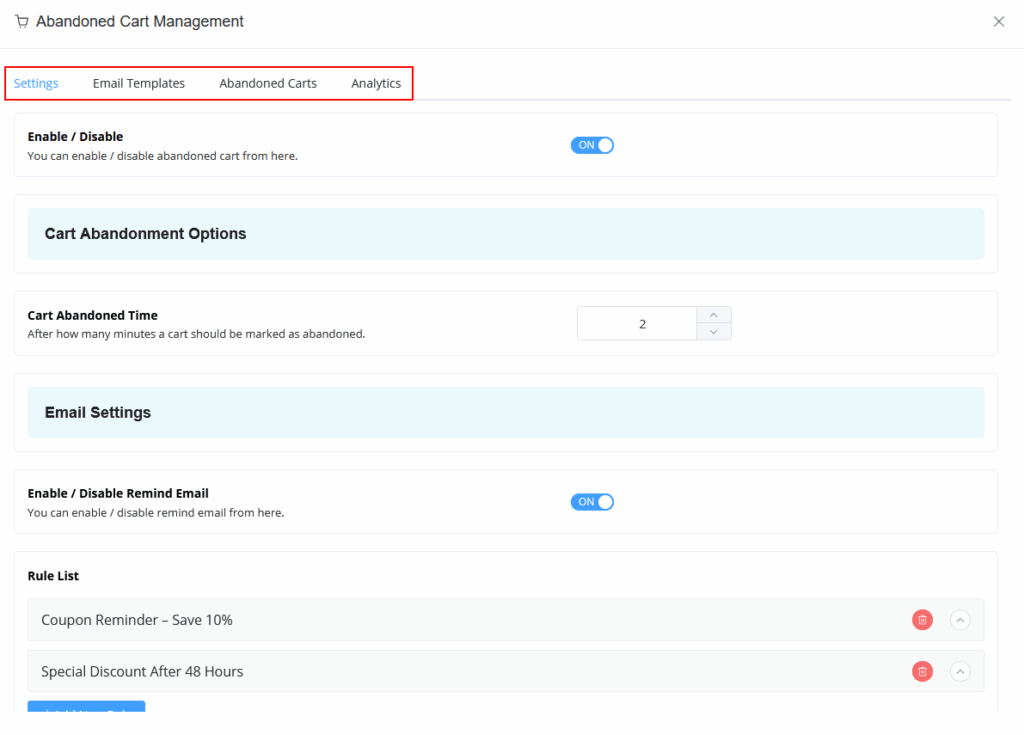
From the Settings tab, you’ll need to enable the Abandoned Cart Recovery option. This activates the entire system and allows you to begin configuring your WooCommerce abandoned cart strategy.
You’ll also want to enable the “Remind Email” option, which specifically activates the email reminder functionality. Don’t forget to set up your “From Name” and “Sender Email Address” – these details will appear in your customers’ inboxes, so make sure they represent your brand professionally.
Step 3: Create Your WooCommerce Abandoned Cart Email Template
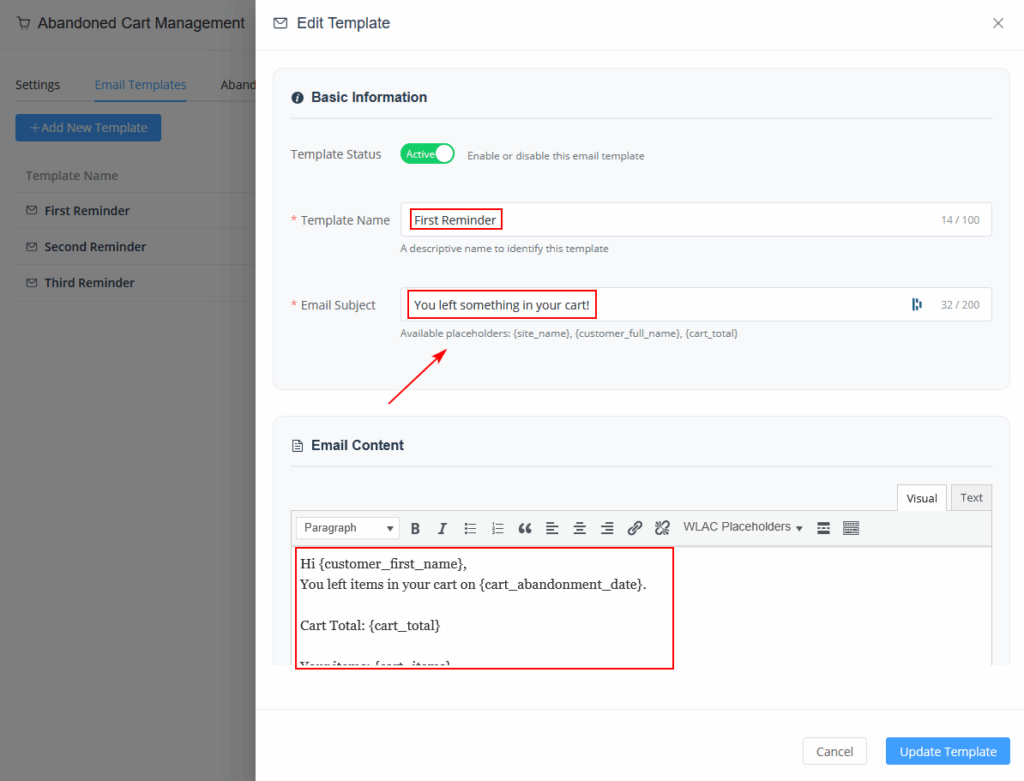
Navigate to the Email Templates tab and click “Add New Template.” This is where you’ll create the actual abandoned cart emails that your customers will receive, forming the core of your recovery strategy.
When creating your abandoned cart email template WooCommerce system, you can customize several key elements:
Template Name: Give your template a descriptive name for easy identification (e.g., “First Reminder Email” or “Discount Offer Email”).
Subject Line: Craft compelling subject lines that encourage opens. Examples include “You left something in your cart!” or “Complete your purchase and save 10%.”
Email Body: Design the main content of your email using proven abandon cart email design principles. ShopLentor provides helpful shortcodes that automatically populate customer-specific information:
- {customer_name} – Personalizes the email with the customer’s name
- {cart_items} – Shows the specific products they abandoned
- {cart_link} – Provides a direct link back to their cart
Coupon Integration: One powerful feature is the ability to include discount coupons in your abandoned cart emails. You can set up automatic coupon generation that provides customers with an incentive to complete their purchase.
Step 4: Set Up Reminder Rules for Your WooCommerce Abandoned Cart
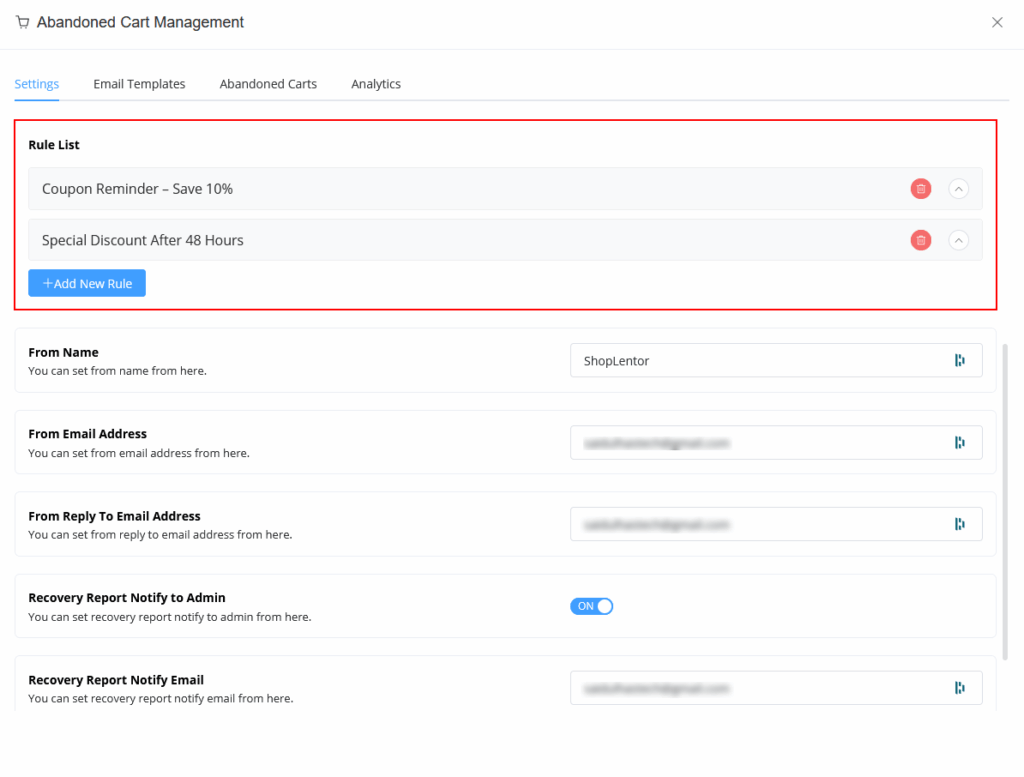
After creating your email templates, establishing the timing for your abandoned cart email sequence is crucial for maximum effectiveness. ShopLentor allows you to create multiple reminder rules with different timings and templates.
For example, you might set up:
- Rule 1: Send a gentle reminder after 1 hour using a friendly template
- Rule 2: Send a discount offer after 24 hours with a coupon code
- Rule 3: Send a final reminder after 48 hours with a larger discount
This multi-touch approach significantly increases your chances of recovering abandoned carts and aligns with 6 WooCommerce Abandoned Cart Best Practices.
Step 5: Monitor and Manage Your Campaign
Once your abandoned cart email system is active, ongoing management ensures optimal performance. You can monitor its effectiveness through the Abandoned Carts tab, where you’ll see all customers who have abandoned their carts, along with details about their cart contents and contact information.
The Analytics tab provides valuable insights into your recovery campaign’s performance, showing metrics like:
- Total abandoned carts
- Successfully recovered carts
- Total revenue recovered
- Campaign effectiveness over time
Best Practices for WooCommerce Abandoned Cart Email Templates
Creating effective abandoned cart email examples requires attention to several key factors that influence customer response rates and conversion success.
Timing Matters: Don’t send abandoned cart emails too quickly (customers might still be shopping) or too late (they might have forgotten about your store entirely). A good starting point is 1 hour, 24 hours, and 48 hours.
Keep It Personal: Use the customer’s name and reference the specific items they left behind in your abandoned cart email template WooCommerce system. Personalization significantly improves response rates.
Create Urgency: Include elements that create a sense of urgency in your abandon cart email design, such as limited-time offers or stock notifications.
Mobile Optimization: Ensure your abandoned cart email templates look great on mobile devices, as many customers will view them on their phones.
Clear Call-to-Action: Make it obvious what action you want customers to take. Use prominent buttons that link directly to their cart or checkout page.
Test Different Approaches: Experiment with different subject lines, email content, and sending times to optimize your abandoned cart email results.
Measuring Success of Your WooCommerce Abandoned Cart Plugin
The effectiveness of your abandoned cart email templates should be measured through several key performance indicators that provide insights into campaign success and areas for improvement.
- Open Rate: The percentage of recipients who open your abandoned cart emails
- Click-Through Rate: The percentage who click on links within your emails
- Conversion Rate: The percentage who complete their purchase after receiving an email
- Revenue Recovery: The total dollar amount recovered through the campaign
ShopLentor’s built-in analytics make tracking these metrics straightforward, providing you with the data needed to continuously improve your cart recovery efforts.
Frequently Asked Questions
How soon should I send the first abandoned cart email?
Send your first abandoned cart email within 1-3 hours after abandonment. This timing catches customers while your store is still fresh in their memory, but gives them enough time to potentially return on their own.
How many abandoned cart emails should I send in a sequence?
A typical abandoned cart email sequence includes 3-4 emails sent over 7-10 days. Start with a gentle reminder, follow with a discount offer, and end with a final urgency-driven message.
What’s the best subject line for abandoned cart emails?
Effective subject lines create curiosity or urgency. Examples include “You left something behind,” “Complete your order + save 10%,” or “Your cart expires in 24 hours.” Test different approaches to see what works for your audience.
Should I include discount codes in all abandoned cart emails?
Not necessarily. Start with a simple reminder email without a discount, then escalate to offering incentives in follow-up emails. This prevents training customers to abandon carts expecting discounts.
Can I customize abandoned cart emails for different product categories?
Yes, many WooCommerce abandoned cart plugins, including ShopLentor, allow you to create different email templates based on product categories, cart value, or customer segments for more targeted messaging.
How do I avoid abandoned cart emails going to spam?
Use a reputable email service, authenticate your domain, maintain clean email lists, write compelling subject lines without spam triggers, and ensure customers can easily unsubscribe.
Conclusion
Implementing abandoned cart email templates is one of the most effective ways to recover lost revenue from your WordPress e-commerce site. Understanding how to add abandoned cart email template functionality properly can transform your store’s revenue recovery potential. With tools like ShopLentor’s Abandoned Cart Recovery module, the process becomes accessible to store owners regardless of their technical expertise.
The key to success lies in creating compelling, personalized abandoned cart email templates for WooCommerce solutions and implementing a strategic sending schedule. By following the steps outlined in this guide on how to add abandoned cart email template systems, you can set up an automated system that works around the clock to recover abandoned carts and boost your store’s revenue.
Remember, even a modest cart recovery rate of 10% can have a significant impact on your bottom line. When you consider that the setup process is relatively simple and the ongoing operation is completely automated, abandoned cart email templates represent one of the highest-ROI activities you can implement for your online store.
Start implementing your WooCommerce abandoned cart strategy today, and begin recovering the revenue that’s currently walking away from your store