Creating a thriving online store demands more than just listing products and enabling checkout. Today’s competitive ecommerce environment requires a strategic approach to WooCommerce design tips that transform ordinary shops into premium shopping destinations.
Whether you’re launching a new store or redesigning an existing one, these WooCommerce design tips will help you build a premium storefront layout that attracts customers, builds trust, and drives conversions.
In this guide, you’ll discover actionable strategies for crafting a luxury ecommerce UX that stands out from competitors and keeps shoppers returning.
Key Takeaways
- Premium themes matter: Choose responsive, lightweight WooCommerce themes that support customization and fast loading
- Product grid optimization drives sales: Editorial-style grids with high-quality imagery increase engagement and conversions
- White space creates luxury: Generous spacing and minimalist layouts signal premium brand positioning
- Mobile-first is essential: Over 60% of shoppers browse on mobile devices, so optimize accordingly
- Trust elements build confidence: Reviews, badges, and secure checkout indicators reduce cart abandonment
- Performance impacts perception: Fast-loading pages are critical for maintaining the high-end shopping experience
ShopLentor- WooCommerce Builder for Elementor & Gutenberg
A versatile page builder to build modern and excellent online stores with more than 100k+ Active Installations.
Why WooCommerce Design Tips Matter for Premium Stores
Your storefront layout directly impacts how customers perceive your brand. Research shows that shoppers form opinions about a website within 50 milliseconds, and design quality is the primary factor.
Following modern WooCommerce design tips ensures your store makes a powerful first impression while delivering functionality that converts browsers into buyers.
Premium WooCommerce visual design goes beyond aesthetics. A well-structured storefront reduces bounce rates, increases time on site, and improves average order value.
Luxury brands understand this: Aesop, Dior, and other high-end retailers invest heavily in clean layouts, sophisticated typography, and seamless navigation because these elements directly correlate with sales performance.
Top WooCommerce Design Tips
1. Choose a Premium, Responsive WooCommerce Theme
The foundation of any successful store starts with theme selection. Your theme determines layout flexibility, loading speed, and mobile responsiveness, all critical factors for ecommerce conversion design.
When applying WooCommerce design tips for premium storefronts, prioritize themes that offer:
- Lightweight codebase: Avoid bloated themes that slow page loading
- Block-based customization: Modern themes support Gutenberg and page builders for flexible layouts
- Typography options: Serif fonts and elegant typefaces enhance luxury perception
- Responsive design: Seamless adaptation across desktop, tablet, and mobile devices
Popular premium-ready themes include Astra, Kadence, and Blocksy, each offering speed optimization and extensive customization capabilities. These themes provide the canvas for implementing additional WooCommerce design tips throughout your store.
2. Product Grid Optimization for Visual Impact
Product grids serve as the visual centerpiece of any WooCommerce store. Effective product grid optimization transforms standard catalog pages into engaging editorial experiences that encourage deeper browsing and higher conversions.
Traditional WooCommerce grids often appear generic—small thumbnails, cramped spacing, and limited visual hierarchy. Premium stores differentiate themselves through editorial shop design that treats product display like magazine layouts.
Implementing Editorial-Style Product Grids
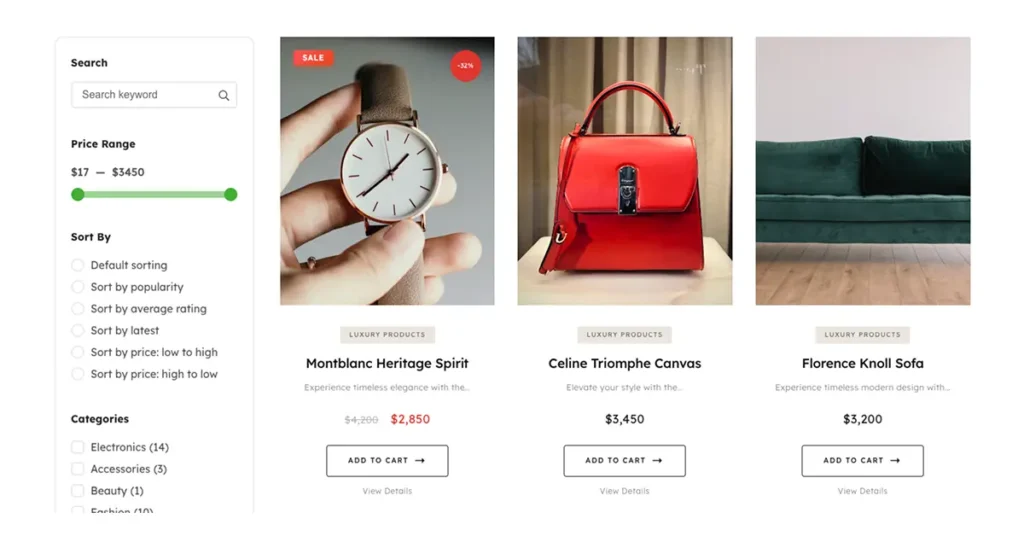
ShopLentor’s Product Grid Luxury widget exemplifies modern WooCommerce design tips applied to product presentation. This widget brings magazine-quality displays to WooCommerce through:
- Four aspect ratio options: Display products in 1:1, 3:4, 4:5, or 9:16 ratios for perfect presentation.
- Automatic discount badges: Circular badges showing a percentage off, calculated automatically—studies show specific discount percentages convert 40% better than generic “SALE” text.
- Product subtitles: Display short descriptions directly in the grid, highlighting key benefits or materials
- Ghost-style CTAs: Elegant transparent buttons with smooth hover animations.
- Editorial typography: Sophisticated serif fonts that elevate the luxury aesthetic.
- Smart badge system: Category badges, new product indicators, and sale badges positioned strategically.
The Product Grid Luxury widget transforms standard WooCommerce shops into premium destinations through thoughtful design details that collectively create a high-end shopping experience.
Best Practices for Grid Configuration
When optimizing your product grids, consider these WooCommerce design tips:
- Use 30-50px gaps between items: Generous spacing creates a premium perception.
- Match aspect ratios to your photography: Square (1:1) works for lifestyle brands, while portrait (4:5) suits fashion.
- Limit products per page to 6-12: Avoid overwhelming shoppers with excessive choices.
- Enable hover effects: Quick view and wishlist actions enhance engagement without cluttering the grid.
Note: If you want to learn more check How to Use Product Grid – Luxury Layout in Elementor
3. High-End Store Elements That Build Trust
Luxury ecommerce UX relies on subtle design cues that collectively signal quality and professionalism. These high-end store elements work subconsciously to build buyer confidence.
White Space and Visual Hierarchy
White space—the empty area around design elements—is perhaps the most powerful tool in premium WooCommerce visual design. Luxury brands use significantly more white space than budget retailers because it:
- Directs attention to featured products
- Creates a sense of exclusivity and sophistication
- Reduces cognitive load for shoppers
- Improves readability and navigation
Apply these WooCommerce design tips by increasing padding around product cards, using generous margins between sections, and avoiding cluttered layouts that overwhelm visitors.
Typography and Color Consistency
Premium storefronts maintain strict consistency in fonts, colors, and button styles throughout the shopping experience. Choose a refined color palette, typically neutral backgrounds with strategic accent colors, and apply it uniformly across all pages.
For typography, consider serif fonts for headlines and product titles (conveying elegance) paired with clean sans-serif fonts for body text (ensuring readability). The Product Grid Luxury widget supports custom typography settings that align with luxury brand aesthetics.
Trust Signals and Security Indicators
Modern shoppers expect visible trust signals before completing purchases. Essential elements include:
- Customer reviews and ratings: Display star ratings prominently on product grids
- Security badges: SSL certificates, payment provider logos, and trust seals
- Clear return policies: Visible links to shipping and return information
- Social proof: User-generated content, testimonials, and purchase notifications
4. Craft Editorial Shop Design with Storytelling
Premium WooCommerce stores go beyond basic product listings by incorporating storytelling elements that connect emotionally with shoppers. Editorial shop design treats your store as a content destination, not merely a transaction platform.
Creating Lifestyle Sections
Use curated collections, lookbooks, and lifestyle imagery to showcase products in context. Rather than isolated product photos, show items being used, worn, or styled—helping shoppers envision ownership.
The Product Grid Luxury widget supports this approach through product subtitles that can highlight:
- Materials and craftsmanship details
- Styling suggestions or room compatibility
- Brand story or artisan information
- Key benefits that differentiate from competitors
Visual Consistency Across Collections
Maintain consistent photography styles, lighting, and backgrounds across your entire catalog. This visual cohesion reinforces brand identity and creates the polished appearance that premium shoppers expect.
5. Conversion-Driven Layouts for Ecommerce Success
Every design element in your WooCommerce store should contribute to ecommerce conversion design, guiding shoppers smoothly from discovery to purchase.
Navigation Optimization
Clear navigation reduces friction and helps shoppers find products quickly:
- Logical category groupings: Organize products intuitively based on shopper expectations
- Sticky navigation bars: Keep menu access visible during scrolling
- Breadcrumb trails: Help shoppers understand their location within your store
- Smart search functionality: Implement predictive search with filters
Mobile-First Design Approach
With mobile commerce accounting for over 60% of online shopping, WooCommerce design tips must prioritize mobile experience:
- Touch-friendly targets: Ensure buttons and links are adequately sized for fingers
- Simplified mobile grids: Use 1-2 columns on smaller screens
- Streamlined checkout: Minimize form fields and enable auto-fill
- Fast mobile loading: Compress images and minimize scripts
The Product Grid Luxury widget includes responsive controls for desktop, tablet, and mobile columns, automatically adapting your editorial layout for optimal viewing on any device.
Performance Optimization
Page speed directly impacts both conversions and search rankings. Premium perception diminishes when pages load slowly. Apply these WooCommerce design tips for performance:
- Enable lazy loading: Load images only as shoppers scroll
- Use optimized image formats: WebP delivers quality at smaller file sizes
- Implement caching: Use caching plugins like WP Rocket or W3 Total Cache
- Minimize plugin bloat: Remove unused extensions that slow your store
6. Implement Advanced Design Solutions with Page Builders
While basic WooCommerce themes provide foundational design capabilities, leveraging specialized tools enables you to implement sophisticated strategies that elevate your premium storefront layout.
Page builder plugins combined with WooCommerce-specific extensions like ShopLentor provide:
- Custom product grid layouts: Beyond default options
- Editorial typography controls: Serif vs. sans-serif options
- Advanced badge positioning: Strategic placement of discount and category indicators
- Sophisticated color schemes: Palette management across all pages
- Responsive design controls: Optimized layouts for all screen sizes
The Product Grid Luxury widget exemplifies this philosophy—bringing professional-grade design tools to store owners without requiring custom development knowledge.
Frequently Asked Questions
What makes WooCommerce design tips different for premium stores?
Premium stores require additional attention to visual refinement, spacing, and brand consistency that budget-focused stores may deprioritize. WooCommerce design tips for luxury storefronts emphasize generous white space, editorial typography, sophisticated color palettes, and high-quality imagery that collectively communicate premium positioning.
How does product grid design impact conversions?
Well-designed product grids increase engagement, time on site, and conversion rates. Editorial-style grids with appropriate aspect ratios, clear pricing, and strategic badges help shoppers evaluate products quickly while maintaining visual appeal. Studies indicate that specific discount percentages displayed on badges convert significantly better than generic sale labels.
What aspect ratio should I use for product images?
The optimal aspect ratio depends on your product type and photography style. Square (1:1) works well for lifestyle and Instagram-aesthetic brands. Portrait ratios (3:4 or 4:5) suit fashion and editorial presentations. Tall ratios (9:16) excel for full-length fashion or vertical products. Most importantly, maintain consistency across your entire catalog.
How much white space is appropriate for luxury WooCommerce stores?
Luxury brands typically use 30-50px gaps between grid items and generous padding around content sections. The key principle: if your layout feels crowded, add more space. White space signals sophistication and helps products stand out without visual competition.
Do I need a page builder plugin for a premium WooCommerce design?
While not strictly required, page builder plugins like Elementor, combined with WooCommerce-specific extensions like ShopLento,r provide significantly more design flexibility than default options. These tools enable implementation of advanced WooCommerce design tips, including editorial product grids, custom layouts, and sophisticated styling—without custom development.
How important is mobile design for WooCommerce stores?
Critical. Mobile commerce continues to grow rapidly, and search engines prioritize mobile-friendly sites. Your premium storefront layout must adapt seamlessly to smaller screens while maintaining brand aesthetics and shopping functionality. Test your store on actual mobile devices, not just browser emulators.
Conclusion
Building a premium WooCommerce storefront requires intentional application of design principles that collectively create luxury shopping experiences. From theme selection and product grid optimization to trust elements and mobile responsiveness, each detail contributes to how shoppers perceive your brand.
These WooCommerce design tips provide the foundation for transforming ordinary online stores into premium destinations that attract discerning customers and drive conversions. Tools like ShopLentor’s Product Grid Luxury widget make implementing editorial-quality product displays accessible to any WooCommerce store owner—no custom development required.
Ready to elevate your storefront? Start by auditing your current design against these WooCommerce design tips, then prioritize improvements that align with your brand positioning and customer expectations. Premium design isn’t about complexity, it’s about thoughtful choices that create cohesive, professional shopping experiences.