
Premium Product Displays with Editorial Elegance
Product Grid Editorial brings high-end, sophisticated aesthetics to your WooCommerce store. Premium Playfair typography, golden accents, and elegant interactions — no design degree required.
3+
Layout Styles
8
Image Ratios
8+
Query Types
60+
Style Options
Editorial-Exclusive Features
These standout features set Product Grid Editorial apart from every other product display widget

“View Details” Overlay
Elegant call-to-action button that appears centered on hover. Smooth fade-in animation with customizable styling. A sophisticated way to drive product page visits.
Editorial Exclusive

Animated Stock Indicators
Pulsing green dots for in-stock items, static red for out-of-stock. Visual urgency that builds buyer confidence without being pushy. Fully customizable text.
Animated Feedback

Professional Image Ratios
Professional photography ratios including 1:1, 3:4, 4:5, and 9:16 for grid view, plus 4:3 and 16:9 for list view. Different options for each layout.
8 Ratio Options
The “View Details” Button That Converts
Unlike standard product links, our elegant overlay button creates a sophisticated call-to-action that demands attention while maintaining premium aesthetics.

Centered Overlay Position
Appears in the center of the image for maximum visibility
Smooth Fade Animation
Elegant fade-in with subtle translate-Y slide effect
Fully Customizable
Control colors, typography, borders, padding, and text
Hover State Change
White background with dark text on hover for interaction feedback
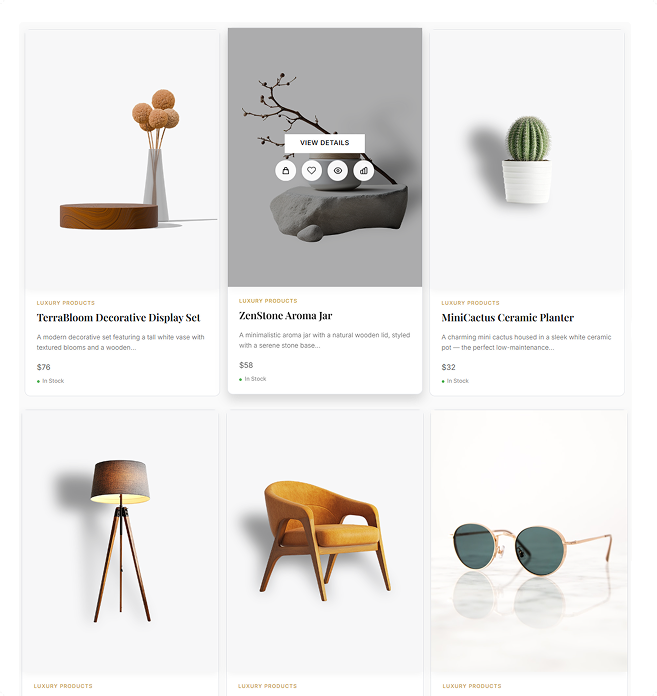
Three Elegant Display Modes
Choose the perfect presentation style for your products and brand aesthetic

Grid View
Card-based layout with prominent images and “View Details” overlay. 15-word descriptions and quick action buttons below overlay.
1-6 Columns
Overlay CTA
Quick Actions

List View
Horizontal layout with 320px image container, extended 30-word descriptions, larger 32px titles, and inline Add to Cart button.
Extended Info
Inline Cart
Discount %

Grid-List Tab
Toggle switcher letting customers choose their preferred view. Customizable default mode with smooth transitions between layouts.
User Choice
View Toggle
Smooth Switch
Ready-to-Use Template Configurations
Import these professionally designed templates from our library and customize to match your brand. Use them as starting points for endless possibilities.
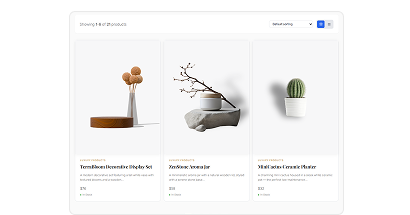
Product Grid – Editorial (Tabs for List & Grid)
A clean editorial-style product grid with List & Grid tabs for faster browsing and smooth catalog navigation.
Best for: Visual Highlights
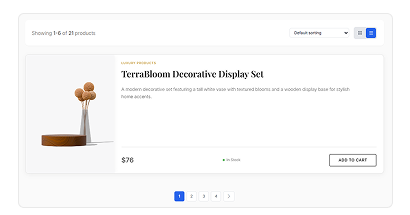
Product Grid – Editorial (List View)
Explore an editorial-inspired modern collection presented in a clean, stylish list layout designed to enhance product browsing.
Best for: Detailed Products
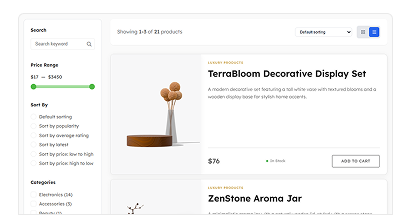
Product Grid – Editorial (List View with Filter)
A clean editorial-style product grid featuring a focused List View with smart filters for faster and streamlined browsing.
Best for: Quick Filtering
Endless Possibilities
These templates combine Grid, List, and Grid-List Tab layouts with different pagination and filter options. Import any template and customize it with 60+ styling options to create your perfect shop page.
Build Your Way – Elementor or Gutenberg
Product Grid – Modern works seamlessly with both page builders. Choose your preferred workflow.

Elementor Widget
Drag and drop modern layouts directly into your Elementor pages with full visual customization and live preview.
- ✓ Visual drag & drop builder
- ✓ Live preview while editing
- ✓ Works with Elementor Free & Pro
- ✓ All customization options

Gutenberg Block
Use the native WordPress block editor to add modern product grids with the same powerful features.
- ✓ Native WordPress editor
- ✓ No extra plugins needed
- ✓ Fast and lightweight
- ✓ Full feature parity
🎯 Same Powerful Features, Your Favorite Builder
All 6 modern layouts, advanced filtering, pagination options, and customization features work identically in both Elementor widget and Gutenberg block. Pick what works best for you!
Ideal Store Types
Product Grid Editorial is designed for brands that value premium aesthetics

Fashion Stores
Editorial image ratios match fashion photography standards

Luxury Retailers
Golden accents convey exclusivity and premium quality

Jewelry Brands
Clean backgrounds and zoom effects highlight details

Home Decor
Extended descriptions explain product features

Cosmetics
Premium presentation for beauty products
Watch Product Grid Editorial in Action
See how easy it is to create stunning product grid in just minutes

Everything You Need
Powerful features for professional product displays without any coding

Quick Action Buttons
- ✓ AJAX Add to Cart
- ✓ Wishlist (WishSuite, YITH)
- ✓ Quick View modal
- ✓ Product Compare
- ✓ 44px circular buttons
- ✓ Golden hover accents

Badge System
- ✓ Sale badge with custom text
- ✓ New badge (1-30 days)
- ✓ Trending/Hot badge
- ✓ Gradient, Solid, Outline styles
- ✓ 3 position options
- ✓ Badge Module compatible

Product Descriptions
- ✓ Grid: 15 words default
- ✓ List: 30 words default
- ✓ Customizable word limits
- ✓ Separate controls per view
- ✓ Typography settings
- ✓ Color customization

Hover Effects (Pro)
- ✓ Card: Lift, Scale, Shadow
- ✓ Image: Zoom, Fade, Grayscale
- ✓ Secondary image on hover
- ✓ Smooth CSS animations
- ✓ 0.6s cubic-bezier timing
- ✓ Mobile-optimized

Pagination Options
- ✓ Numbers (Free)
- ✓ Load More button (Pro)
- ✓ Infinite Scroll (Pro)
- ✓ Custom button text
- ✓ Loading spinner
- ✓ Full styling control

60+ Styling Options
- ✓ Product card styling
- ✓ Typography controls
- ✓ Color customization
- ✓ Border & shadow
- ✓ Spacing controls
- ✓ Responsive settings
Powerful Query System
Display exactly what you want with 8+ query types and advanced filtering

All Products
Display entire catalog

Recent Products
Show latest additions

Manual Selection
Hand-pick specific items

Featured
Highlight promoted items
PRO

On Sale
Show discounted items
PRO

Best Selling
Display top performers
PRO

Top Rated
Show highest rated
PRO

Recently Viewed
Personalized display
PRO
Advanced Filtering Options
📂 Filter by Categories
🏷️ Filter by Tags
🚫 Exclude Products
📦 Exclude Out of Stock
🖼️ Exclude Without Images
🔍 Filterable Option
↕️ 11 Sorting Methods
Our Users Share Their Experience
Read what store owners say about our module’s impact on their business efficiency and customer satisfaction.
5.0

Super fast assistance!
I’m very impressed with the speed of the support team. I had a request to remove a category label, and they not only replied quickly but also logged in to fix it for me. Everything works perfectly now. Thanks for the great help!
mrrick97
(@mrrick97)
18 Dec 2025
5.0
Friendly and professional support
I sent an email to inquire about the Display in ShopLentor Plugin issue. I received a quick reply and the issue was resolved. Thank you very much.

raycksh
(@raycksh)
14 May 2025
5.0
Awesome software with great support
Great product all round with awesome backup service. Thanks for the assistance chaps.
ryanduncan
(@ryanduncan)
24 Feb 2025
5.0
Great Plugin, with Great support
The plugin works flawlessly, And when i faced some issue with some elements not rendering properly their support was prompt in helping me out, really satisfied with their service.

swrnvnams
(@swrnvnams)
27 Apr 2025
5.0
Best Plugin ever
The best plugin with all functions for woocommerce!
I loved it and also their support team is very helpful!
Thanks a lot!

ericreates
(@ericreates)
24 Feb 2025
5.0
Good One.
Good plugin works well with Elementor Pro. Supports custom template builder with ACF Fields which is very productive in creative development with less coding. Thanks to the development team.

webtinker
(@webtinker)
17 Jan 2025
Frequently Asked Questions
Everything you need to know about Product Grid Editorial
What’s the difference between Editorial, Modern, and Luxury grids?
Product Grid Editorial focuses on high-end aesthetics with Playfair Display typography, golden accents (#C9A14A), “View Details” overlay buttons, and animated stock indicators. Modern offers minimalist contemporary designs, while Luxury provides opulent styling for high-end retailers. Editorial is perfect for fashion stores and brands wanting premium presentation.
Can I use this with both Elementor and Gutenberg?
Yes! Product Grid Editorial is available as both an Elementor widget (WL: Product Grid – Editorial) and a Gutenberg block (WL: Product Grid Editorial) with identical features. Choose whichever page builder you prefer.
What makes the “View Details” button special?
Unlike simple product links, our View Details button appears as an elegant overlay centered on the image during hover. It features smooth fade-in animation with translateY slide effect, transparent background with white border, and fully customizable styling. It’s exclusive to the Editorial style and significantly increases product page visits.
Do stock indicators show actual quantities?
The indicators show “In Stock” or “Out of Stock” status with animated/static dots. They don’t display exact quantities by default. You can customize the text labels to say anything you want, like “Available” or “Sold Out.”
Which image ratios should I use for fashion products?
For fashion and apparel, we recommend 4:5 (Editorial) for professional lookbooks, 3:4 (Portrait) for classic product shots, or 9:16 (Tall) for full-body fashion photography. These professional ratios give your products a high-end, sophisticated appearance.
Do hover effects work on mobile devices?
Hover effects are designed for desktop interactions. On mobile/touch devices, they’re automatically disabled for better user experience. The View Details button and quick actions are still accessible through tap interactions.
Ready for Premium Product Displays?
Transform your WooCommerce store with editorial elegance. No design skills required.
- Risk-free purchase guaranteed
- Secure payment processing
- Lifetime updates
- Priority support included
- Cross-browser compatibility
★★★★★ 4.4/5 rating
From 216+ reviews
Trusted by 100,000+
Active stores wordwide
32% Average Growth
In revenue after implementation