
Transform Your Store Into a Fashion Magazine
Create stunning product grid magazine style displays with asymmetric layouts, elegant product numbering, and publication-quality designs. Works with Elementor & Gutenberg.
12
Column Grid System
3
Layout Modes
100+
Style Options
∞
Design Possibilities
The Magazine Difference
Four standout features that transform ordinary product grids into fashion publication masterpieces

Asymmetric Grid Layout
Dynamic 12-column grid with alternating column spans (5-7, 6-6, 7-5, 4-8) that creates visual interest and guides the eye naturally through products.
Unique Pattern

Magazine Numbering
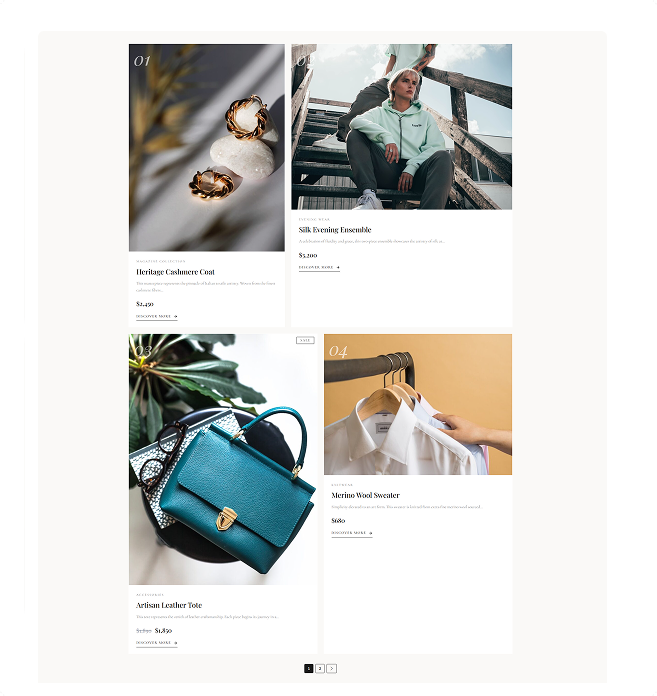
Large, elegant italic numbers (01, 02, 03…) overlaid on product images, reminiscent of high-end fashion magazine spreads.
Editorial Style

Alternating Ratios
Odd products use 3:4 portrait ratio, even products use 4:3 landscape for dynamic visual flow that keeps browsing exciting.
Visual Flow
The Asymmetric Grid That Captivates
Unlike traditional uniform grids, Product Grid Magazine uses a sophisticated 12-column asymmetric pattern that repeats every 8 products, creating a dynamic magazine-spread feel.
01
5 Columns
Compact, attention-grabbing
02
7 Columns
Expanded, feature-worthy
03-04
6 Columns
Balanced, harmonious
07-08
4-8 Columns
Dynamic contrast
Ready-to-Use Template Configurations
Import these professionally designed templates from our library and customize to match your brand. Use them as starting points for endless possibilities.
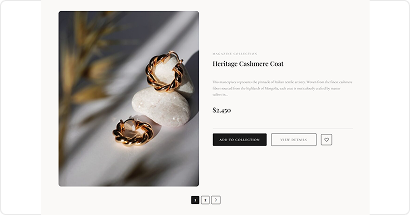
Product Grid – Magazine (Curated Editorial Showcase)
A curated editorial-style product grid that blends magazine aesthetics with clean visuals to elevate your shop.
Best for: Editorial Highlights
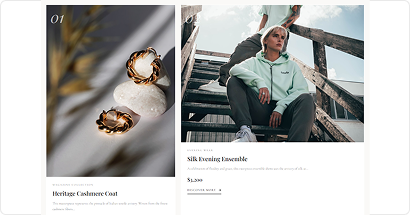
Product Grid – Magazine (Curated Showcase)
A clean, magazine-style product grid designed to highlight items with a curated, editorial shopping experience.
Best for: Curated Listings
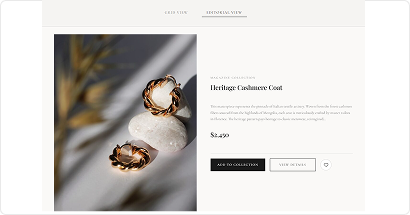
Product Grid – Magazine (Tabs for List & Grid)
A modern magazine-style product grid with tabbed layouts for smooth switching between list and grid views.
Best for: View Switching
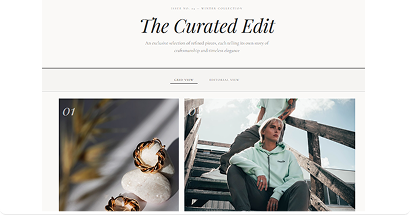
Product Grid – Magazine (Styled Lookbook Edition)
A stylish magazine-inspired product grid crafted for lookbook-style showcasing, perfect for highlighting curated items.
Best for: Lookbook Displays
Build Your Way – Elementor or Gutenberg
Product Grid Magazine works seamlessly with both page builders. Choose your preferred workflow.

Elementor Widget
Drag and drop magazine layouts directly into your Elementor pages with full visual customization and live preview.
- ✓ Visual drag & drop builder
- ✓ Live preview while editing
- ✓ Works with Elementor Free & Pro
- ✓ All customization options

Gutenberg Block
Use the native WordPress block editor to add modern product grids with the same powerful features.
- ✓ Native WordPress editor
- ✓ No extra plugins needed
- ✓ Fast and lightweight
- ✓ Full feature parity
🎯 Same Powerful Features, Your Favorite Builder
All magazine layouts, asymmetric grids, and customization options work identically in both Elementor and Gutenberg!
Everything for Magazine-Quality Displays
Packed with powerful features to create fashion publication-worthy shopping experiences

Layout & Display
- ✓ Asymmetric 12-column grid
- ✓ Alternating image ratios (3:4, 4:3)
- ✓ Grid View with numbering
- ✓ Editorial List View
- ✓ Grid-List Tab Toggle (Pro)
- ✓ FadeInUp animations

Editorial Elements
- ✓ Magazine product numbering
- ✓ Featured editorial badge
- ✓ Inline featured label
- ✓ Product details section
- ✓ “Discover More” button
- ✓ Playfair Display typography

eCommerce Features
- ✓ Quick Add to Cart
- ✓ Wishlist integration
- ✓ Quick View modal
- ✓ Product comparison
- ✓ Sale & New badges
- ✓ Stock status display

Filtering & Sorting
- ✓ Category & tag filters
- ✓ Product exclusion
- ✓ Order by multiple criteria
- ✓ Exclude out of stock
- ✓ Exclude no image
- ✓ Advanced query options (Pro)

Pagination Options
- ✓ Numbered pagination
- ✓ Load More button (Pro)
- ✓ Infinite Scroll (Pro)
- ✓ Custom button text
- ✓ Loading animations
- ✓ SEO-friendly URLs

Styling Options
- ✓ 100+ customization options
- ✓ Typography controls
- ✓ Color customization
- ✓ Spacing & padding
- ✓ Border & shadow
- ✓ Responsive settings
Standard Grid vs Magazine Grid
See how Product Grid Magazine transforms ordinary product displays into fashion publication masterpieces

Standard Product Grids
- Uniform, predictable layouts
- No visual hierarchy or flow
- Generic product cards
- Missing editorial elements
- Basic typography choices
- Looks like every other store
Result: Forgettable Shopping Experience

Product Grid Magazine
- Dynamic asymmetric layouts
- Natural eye flow through products
- Magazine-style product numbering
- Editorial badges & labels
- Playfair Display typography
- Unique, memorable brand identity
Result: Fashion Magazine Experience
Ideal for These Store Types
Product Grid Magazine is designed for brands that want to elevate their product presentation

Fashion & Apparel
Boutiques & designer retailers

Luxury Brands
Jewelry & premium goods

Editorial Shops
Curated lifestyle collections

Creative Agencies
Portfolio & design stores

Influencer Stores
Personal brand storefronts
Create Magazine Layouts in 4 Simple Steps
No design experience required. Transform your store in minutes.


1. Install ShopLentor
Download and activate ShopLentor plugin from WordPress repository
⏱ 30 seconds

2. Add Magazine Widget
Drag the Magazine grid widget into your page with Elementor or Gutenberg
⏱ 1 minute

3. Customize Style
Adjust typography, colors, numbering, and all visual elements
⏱ 3 minutes

4. Publish & Impress
Go live and watch your store transform into a fashion magazine
⏱ Instant
Watch Product Grid Magazine in Action
See how easy it is to create stunning magazine-style product displays

Our Users Share Their Experience
Read what store owners say about our module’s impact on their business efficiency and customer satisfaction.
5.0

Super fast assistance!
I’m very impressed with the speed of the support team. I had a request to remove a category label, and they not only replied quickly but also logged in to fix it for me. Everything works perfectly now. Thanks for the great help!
mrrick97
(@mrrick97)
18 Dec 2025
5.0
Friendly and professional support
I sent an email to inquire about the Display in ShopLentor Plugin issue. I received a quick reply and the issue was resolved. Thank you very much.

raycksh
(@raycksh)
14 May 2025
5.0
Awesome software with great support
Great product all round with awesome backup service. Thanks for the assistance chaps.
ryanduncan
(@ryanduncan)
24 Feb 2025
5.0
Great Plugin, with Great support
The plugin works flawlessly, And when i faced some issue with some elements not rendering properly their support was prompt in helping me out, really satisfied with their service.

swrnvnams
(@swrnvnams)
27 Apr 2025
5.0
Best Plugin ever
The best plugin with all functions for woocommerce!
I loved it and also their support team is very helpful!
Thanks a lot!

ericreates
(@ericreates)
24 Feb 2025
5.0
Good One.
Good plugin works well with Elementor Pro. Supports custom template builder with ACF Fields which is very productive in creative development with less coding. Thanks to the development team.

webtinker
(@webtinker)
17 Jan 2025
Frequently Asked Questions
Everything you need to know about Product Grid Editorial
How is Magazine different from other product grids?
Product Grid Magazine features a unique asymmetric 12-column grid pattern, prominent product numbering (01, 02, 03…), alternating image aspect ratios, and editorial badges — all designed to mimic high-end fashion publication layouts. No other grid offers this combination.
How does the asymmetric grid pattern work?
The grid uses a 12-column system with products spanning different numbers of columns in a repeating 8-item pattern (5-7, 6-6, 7-5, 4-8). This creates dynamic visual flow that guides the eye naturally through your product collection.
Can I disable the product numbers?
Yes! Both grid and list view product numbers can be toggled on/off independently through the display settings. You have full control over which elements appear.
Does the numbering continue across pagination?
Yes! The product numbering system is pagination-aware and continues correctly across pages. For example, if showing 8 products per page, page 2 starts at product 09.
What products trigger the Featured badge?
The editorial “Featured” badge appears on products that are marked as “Featured” in WooCommerce (the star icon in the product editor). This is controlled through WooCommerce’s built-in product settings.
Is it mobile responsive?
Absolutely! The layout automatically adjusts for mobile devices while maintaining the magazine aesthetic with single-column display and touch-friendly elements. The product numbering and editorial feel remain intact on all screen sizes.
Ready to Create Magazine-Quality Displays?
Join fashion-forward brands using Product Grid Magazine to transform their WooCommerce stores into editorial experiences.
- Risk-free purchase guaranteed
- Secure payment processing
- Lifetime updates
- Priority support included
- Cross-browser compatibility
★★★★★ 4.5/5 rating
From 218+ reviews
Trusted by 100,000+
Active stores wordwide
32% Average Growth
In revenue after implementation