Every day, WooCommerce store owners face a silent revenue killer: 70% of shopping carts are abandoned before checkout completion. This statistic, confirmed by the Baymard Institute, translates into devastating losses for online retailers. For a mid-sized WooCommerce store, this represents approximately $1.2 million in annual lost revenue.
But here’s the good news: a significant portion of that revenue is recoverable.The difference between struggling store owners and thriving ones often boils down to a single strategic decision, whether they implement automated WooCommerce abandoned cart recovery.
The numbers prove this approach works. Well-executed recovery campaigns recover 10-30% of the value of abandoned carts, with top performers achieving even higher rates. That’s not just profit recovery; it’s a competitive advantage.
In this comprehensive guide, you’ll discover exactly how to recover those lost sales through proven strategies, multi-channel approaches, and actionable implementation steps. Whether you’re new to cart recovery or looking to optimize an existing system, this guide covers everything from foundational concepts to advanced segmentation tactics.
Here’s what makes this guide different: It includes real statistics backed by authoritative research (Baymard Institute, industry benchmarks), specific timing recommendations based on customer psychology, and step-by-step ShopLentor implementation instructions that take just 3-5 minutes to set up.
Key Takeaways
- 70% of carts abandoned, a massive revenue opportunity awaits.
- Multi-stage emails recover 10-30% of lost sales reliably.
- Automation reduces setup time to under 5 minutes.
- SMS recovery achieves 98% open rates and urgency.
- Average ROI reaches 1,400% from recovery efforts.
- Guest cart capture prevents abandonment tracking gaps.
Make use of the
Best WooCommerce Builder
You must have done your research and determined that WooLentor is the best WooCommerce
Addon for Elementor at this point. Take advantage of it!
What is WooCommerce Cart Abandonment? (Foundational Concept)
Before diving into recovery strategies, let’s establish what we’re dealing with.
Cart abandonment occurs when a customer adds products to their shopping cart but leaves without completing the purchase. This happens after they’ve already navigated your store, selected items, and initiated checkout, demonstrating genuine purchase intent.
This differs from simple browsing. When someone abandons a cart, they’ve already decided to buy; they’ve just encountered friction, doubt, or distraction before taking final action.
Why Cart Abandonment Matters
The global recoverable revenue from abandoned carts exceeds $260 billion annually. In WooCommerce specifically, the impact is equally staggering. Every store experiences abandonment; the ones that recover that revenue pull significantly ahead of competitors.
Key Distinction: Abandonment vs. Recovery
- Cart Abandonment: Products added to the cart, but the purchase was never completed
- Cart Recovery: The strategic process of bringing customers back to complete those purchases
- Recovery Rate: The percentage of abandoned carts that result in completed purchases (targets: 10-30%)
Understanding this distinction matters because recovery is entirely within your control. You cannot eliminate abandonment—some level is natural browsing behavior. But you absolutely can recover those sales through systematic strategies.
The Complete Guide to WooCommerce Abandoned Cart Recovery
This section covers every proven method to recover lost sales systematically. Implement these strategies sequentially, starting with the highest-impact approaches.
Understand Your Cart Abandonment Rate & Recovery Metrics
Before optimizing, you need a baseline to measure against.
Calculating Your Abandonment Rate:
Use this simple formula:
Cart Abandonment Rate = (1 – (Completed Purchases / Shopping Carts Created)) × 100
Example: If your store creates 1,000 shopping carts monthly and completes 300 purchases:
- Rate = (1 – (300/1,000)) × 100 = 70% abandonment
Industry Benchmarks to Compare Against:
| Performance Level | Abandonment Rate |
| Excellent (Top 25%) | Below 60% |
| Good | 60-65% |
| Average | 65-75% |
| Needs Improvement | Above 75% |
Device-Specific Benchmarks:
- Desktop: 73.07% abandonment
- Tablet: 80.74% abandonment
- Mobile: 85.65% abandonment (highest challenge)
Critical KPIs to Track:
- Total Abandoned Carts: Raw count of recovery opportunities
- Recovered Carts: How many abandoned carts resulted in completed purchases
- Recovery Revenue: Total dollar amount recovered
- Recovery Rate: (Recovered Carts / Abandoned Carts) × 100
- Email Open Rate: Percentage of recovery emails opened (target: 50%+)
- Click-Through Rate: Percentage clicking the cart recovery link (target: 21-23%)
- Conversion Rate: Abandoned cart customers who complete purchase (target: 10-30%)
Why These Metrics Matter: You cannot optimize what you don’t measure. These KPIs transform abandonment from a vague problem into actionable data, driving specific improvement.
Enable Automated Multi-Stage Email Recovery Sequences
Email remains the highest-ROI recovery channel, with 50.5% open rates and 21-23% click-through rates—far exceeding standard email marketing benchmarks.
Why Multi-Stage Sequences Outperform Single Emails:
A single reminder email gets ignored or forgotten. But a strategic sequence builds persistent, non-aggressive urgency. Research shows three-email sequences recover 69% more orders than single-email approaches.
Optimal Email Sequence Timing:
Email 1 (1 Hour After Abandonment):
- Purpose: Gentle, non-incentivized reminder
- Goal: Catch customers while purchase intent is highest
- Tone: Helpful, not pushy (“You left something in your cart!”)
- Incentive: None (saves your discount leverage)
- Expected performance: 15-20% recovery rate
Email 2 (24 Hours After Abandonment):
- Purpose: Address objections and rebuild interest
- Content: Highlight product value, include customer testimonials, link to return policy
- Tone: Educational and reassuring
- Incentive: None yet (reserve for final push)
- Expected performance: 5-10% recovery rate
Email 3 (48-72 Hours After Abandonment):
- Purpose: Final incentivized push
- Content: Time-limited coupon code, free shipping offer, or percentage discount
- Urgency Element: “This offer expires in 24 hours.”
- Tone: Friendly but urgent
- Expected performance: 5-10% recovery rate
Combined Email Sequence Expected Results:
- Total recovery rate from sequence: 25-40%
- Revenue per email sent: $3.65 average (top performers: $28.89)
Email Template Essential Elements:
- Personalization: Customer name, product names, cart total.
- Product Display: Product images and titles (let visuals remind them).
- Direct Cart Link: One-click restoration to their exact cart.
- Trust Elements: SSL badge, satisfaction guarantee, and return policy link.
- Single Clear CTA: “Restore My Cart” or “Complete My Purchase”.
- Mobile Optimization: Responsive design that works on all devices.
Segment & Target Abandoned Carts Strategically
Not all abandoned carts deserve identical treatment. Strategic segmentation dramatically improves both recovery rate and profit margin.
Segmentation Strategy #1: High-Value vs. Low-Value Carts
- High-Value Carts (>$150): Offer aggressive incentives (15-20% discount or free shipping). These customers considered high-ticket purchases; they deserve premium service.
- Medium-Value Carts ($50-$150): Offer moderate incentives (10% discount or free shipping on orders over $50)
- Low-Value Carts (<$50): No incentive needed. A simple reminder recovers most of these (lower discount impact on margins)
Segmentation Strategy #2: First-Time vs. Repeat Abandoners
- First-Time Abandoners: Send trust-focused content. Include security badges, testimonials, and detailed product descriptions. Emphasize reliability and safety.
- Repeat Abandoners (multiple abandoned carts): Send urgency-focused content with stronger incentives. These customers want to buy but face consistent friction; address specific obstacles.
Segmentation Strategy #3: Customer History
- New Customers: Provide extra reassurance. Include returns policy, guarantee information, and customer testimonials prominently.
- Returning Customers: Reference their purchase history. Offer loyalty rewards or exclusive returning-customer discounts.
Segmentation Strategy #4: Device-Specific Targeting
- Mobile Users (85.65% abandonment): Design mobile-optimized recovery emails with large buttons, minimal text, and one-tap checkout. Consider SMS recovery for mobile carts.
- Desktop Users: Can handle more detailed content and complex product information.
Segmentation Strategy #5: Cart Composition
- Single-Item Carts: Simple recovery strategy needed; likely specific interest
- Multi-Item Carts: Higher value; use detailed product reminders showing all items
- Zero-Value Carts: Exclude from campaigns (often test purchases or errors)
Implementation Rule: Always exclude carts below your profitability threshold. If your average order profit is $15, exclude carts under $20 to avoid negative ROI.
Create Compelling Abandoned Cart Recovery Offers
The right offer transforms a reminder into an irresistible action call.
High-Performing Offer Types:
1. Free Shipping Offer (Most Common, Most Effective)
- Why it works: Shipping costs drive 48% of cart abandonments
- Psychology: Removes the “hidden cost” friction
- Best for: Carts $50-$150
- Expected impact: 20-30% recovery boost
2. Time-Limited Percentage Discount
- Example: “10% off this order, valid for 24 hours”
- Why it works: Creates scarcity and urgency psychologically
- Best for: Medium-value carts
- Expected impact: 15-25% recovery boost
- Warning: Monitor margin impact; don’t discount below profitability
3. Fixed Dollar Amount Discount
- Example: “$10 off your order”
- Why it works: Feels concrete rather than percentage-based
- Best for: Higher-value carts where percentage discount seems small
- Expected impact: 15-25% recovery boost
4. Tiered Discount Strategy
- Cart >$100: Free shipping
- Cart >$200: 10% off + free shipping
- Why it works: Aligns incentive magnitude with purchase value
- Expected impact: 25-35% recovery boost
5. Free Product with Purchase
- Example: “Free gift card with your purchase”
- Psychology: Feels like a bonus rather than a discount
- Best for: High-margin products or clearance items
- Expected impact: 20-30% recovery boost
6. Exclusive Loyalty Offer
- “VIP customers get 15% off”
- Why it works: Rewards existing relationships; builds loyalty
- Best for: Repeat customers
- Expected impact: 25-40% recovery boost
Data Point: Offering any discount increases recovery by 40%. But discounting too aggressively erodes margins. Strategic segmentation (different offers for different cart values) optimizes both recovery and profitability.
Critical Rule: Reserve your best incentive for the final email. This creates an escalation sequence that respects customer psychology while maintaining urgency.
Leverage SMS & Multi-Channel Recovery Beyond Email
Email is powerful, but combining channels amplifies results dramatically.
SMS Recovery: The High-Impact Channel
Why SMS Deserves Attention:
- 98% open rate (emails: 50.5%)
- Read within minutes (emails: hours or days)
- Creates immediate urgency
- Perfect for high-value carts
When to Use SMS:
- High-value abandoned carts (>$200)
- Time-sensitive offers with tight deadlines
- Repeat customers who’ve opted into SMS programs
- Paired with email sequences (not replacing them)
SMS Best Practices:
- Keep under 160 characters (fits single text)
- Direct link to restore cart
- Single clear offer
- Example: “Your $250 order is waiting! Use code SAVE10 for 10% off. Expires in 24 hours: [link]”
Browser Push Notifications: The Non-Intrusive Alternative
- 7% conversion rate (lower than email but non-invasive)
- Subscribers already opted in
- Immediate notification when browsing the web
- Good for frequent interactions without overwhelming
Retargeting Ads (Display/Social):
- Reaches cart abandoners across the web
- Keeps brand visible during consideration period
- Works best paired with email sequences
- Budget: Typically lower ROI than email alone
Multi-Channel Frequency Rules (Prevent Customer Fatigue):
- Email: Max 3-4 emails per sequence
- SMS: 1-2 messages per campaign (99% exceeds customer tolerance)
- Retargeting ads: Show 3-5 times before frequency-capping
- Combined total: No more than 6-7 touchpoints per abandoned cart
Customize & Personalize Email Templates for Maximum Engagement
Generic templates underperform personalized ones by 200-300%.
Template Structure That Converts:
1. Subject Line (The Make-or-Break Element)
- Most Important: Gets the email opened
- Personalization: Include customer name or product name
- Examples That Work:
- “You left your [PRODUCT NAME] behind, [CUSTOMER]”
- “Still thinking about that [PRODUCT]?”
- “[CUSTOMER], complete your order and save 10%”
- A/B Test: Test 2-3 subject line variations to identify winners
- Avoid: ALL CAPS, excessive punctuation, spam words (“FREE” triggers filters)
2. Preview Text (Visible in Inbox Preview)
- Example: “Your cart is about to expire—here’s 10% off”
- Goal: Entice open before subject line is even read
- Length: 40-60 characters (platform limit)
3. Email Header/Hero Image
- Show the abandoned product prominently
- Include cart total to remind of order value
- Mobile-responsive and clear
4. Email Body Content (Keep It Concise)
- Paragraph 1: Brief, friendly reminder with personalization
- Paragraph 2: Highlight product benefits (why they chose it)
- Paragraph 3: Address common objections (quality, returns, shipping)
- Use customer testimonials or review quotes
- Include security/trust badges
5. Product Display Section
- Show product image (visual reminder is powerful)
- Product name and price
- Brief product description or key benefits
- Single CTA button: “Restore My Cart”
6. Incentive Display
- Make the coupon code prominent and easy to copy
- Display expiration time clearly
- Example: “Use code SAVE10 for 10% off (expires in 24 hours)”
7. Footer Trust Elements
- Money-back guarantee
- Free return shipping policy
- Customer service contact information
- SSL badge / Security information
Personalization Tokens That Increase Performance:
- {customer_name}: “Hi Sarah,”
- {product_name}: “Your [Product Name] is waiting”
- {cart_total}: “Your $127.50 order”
- {discount_percentage}: “Save 10% today”
- {expiration_time}: “Offer expires in 24 hours”
A/B Testing Variables (Test One Per Campaign):
- Subject lines (friendly vs. urgent tone)
- CTA button text (“Complete Purchase” vs. “Restore My Cart”)
- Incentive type (free shipping vs. percentage discount)
- Incentive position (early vs. late in email)
- Product display style (grid vs. list)
Performance Targets:
- Open rate: 50%+ (anything below suggests weak subject line)
- Click rate: 21-23% (below suggests weak CTA)
- Conversion rate: 10-30% (indicates overall email quality)
Track & Measure Recovery Campaign Performance
Data transforms guesswork into strategy. Essential Metrics Dashboard:
| Metric | Formula | Target | What It Measures |
| Abandoned Carts | Total carts not completed | Baseline | Size of recovery opportunity |
| Recovered Carts | Completed purchases from abandoned | 10-30% of abandoned | Campaign effectiveness |
| Recovery Rate | (Recovered / Abandoned) × 100 | 10-30% | Percentage of abandonment recovered |
| Recovery Revenue | Dollar value of recovered sales | Varies | Financial impact |
| Email Open Rate | (Opened / Sent) × 100 | 50%+ | Email deliverability & subject line quality |
| Click-Through Rate | (Clicked / Opened) × 100 | 21-23% | Email content & CTA effectiveness |
| Conversion Rate | (Purchased / Clicked) × 100 | 15-40% | Overall email quality |
| Revenue Per Email Sent | Recovery Revenue / Emails Sent | $3.65+ | True ROI of email channel |
| ROI | (Revenue Recovered – Campaign Cost) / Campaign Cost × 100 | 1,400%+ | Overall program profitability |
Weekly Performance Dashboard to Monitor:
- Monday: Review previous week’s recovery stats
- Wednesday: Analyze email performance (opens, clicks, conversions)
- Friday: Test new subject lines or offers for upcoming sequence
- Identify patterns (which day recovers most sales? which time?)
Monthly Analysis to Optimize:
- Which email performs best? First, second, or third email?
- Which segments convert highest? High-value, first-time, mobile, etc.?
- Which offers work best? Free shipping vs. discounts vs. loyalty offers?
- What’s your average cart value trend? Rising or declining?
- Mobile vs. desktop performance: Different recovery rates?
Data-Driven Optimization Cycle:
- Week 1-2: Collect baseline data
- Week 3-4: Identify best-performing variables
- Week 5-6: Test new subject lines with top-performing offer
- Week 7-8: Scale what works; sunset what doesn’t
- Repeat monthly
Red Flags Indicating Problems:
- Open rate <30%: Subject lines need testing
- Click rate <15%: Email content or CTA needs improvement
- Conversion rate <5%: Offer may not be compelling enough
- No recovered carts in first 48 hours: Timing or targeting issue
Prevent Cart Abandonment Before Recovery is Needed
Prevention is always more profitable than recovery.
Checkout Optimization: The Biggest Impact
- Reduce form fields to 8 or fewer (removes 25% of abandonment friction)
- Single-page checkout (multi-page checkout increases abandonment by 20%)
- Guest checkout option (forces 24% of customers to abandon)
- Progress indicators (show customers where they are in the process)
- Auto-fill enabled (reduces form entry friction)
- Clear error messages (don’t confuse customers with technical jargon)
Mobile Optimization Priority (85.65% Mobile Abandonment):
- Responsive design that works on screens of all sizes
- Large, easy-to-tap buttons (minimum 44px × 44px)
- Simplified forms (mobile users abandon complex forms 2x more)
- Mobile wallet integration (Apple Pay, Google Pay—show these prominently)
- Page speed (1-second delay = 7% conversion loss on mobile)
- Zoom-friendly text (readable without pinching)
Trust-Building Elements (Reduce 19% Trust-Related Abandonment):
- SSL certificate (secure padlock visible)
- Trust badges (Norton, McAfee, etc.)
- Money-back guarantee (clearly displayed)
- Customer testimonials (include star ratings)
- Return policy link (prominent in checkout)
- Customer service contact (live chat or phone number)
Shipping Cost Transparency (48% Abandon Due to Hidden Costs):
- Show shipping cost early (not at the final step)
- Offer shipping options (standard, express, overnight)
- Free shipping threshold (e.g., “Free shipping on orders over $75”)
- Flat rate shipping (simpler than calculated rates)
Payment Options (Security Concerns Drive 19% Abandonment):
- Multiple payment methods (credit card, PayPal, Apple Pay, Google Pay)
- Trusted payment processors (Stripe, Square, PayPal Pro)
- Security indicators are visible during payment
Implement Recovery with ShopLentor: Step-by-Step Setup
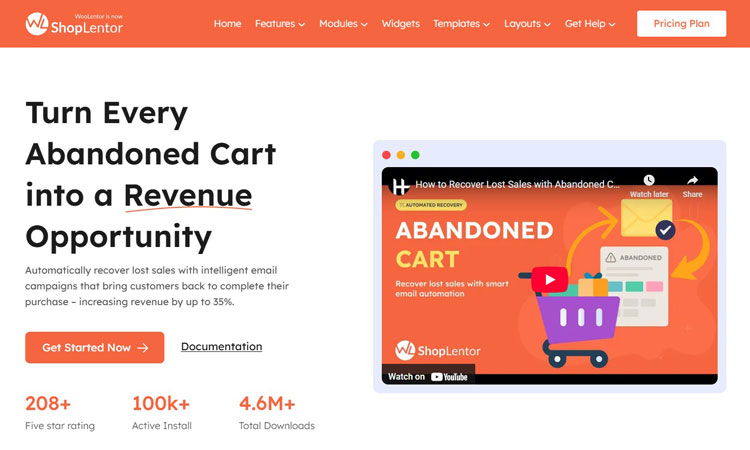
ShopLentor’s Abandoned Cart Recovery module takes just 3-5 minutes to set up, yet delivers enterprise-grade functionality.
Why ShopLentor Stands Out:
- 100,000+ active installations (proven by 4.6 million downloads)
- 28% reduction in cart abandonment (documented case studies)
- 15-30% automatic cart recovery (without manual effort)
- 1,400% average ROI (from recovery campaigns)
- First recovered cart within 24 hours (most users see immediate results)
Step-by-Step Implementation:
Step 1: Enable the Module

- Log in to the WordPress dashboard
- Navigate to: ShopLentor > Settings > Modules > Abandoned Cart
- Click Enable Abandoned Cart Recovery
- Click Enable Remind Email
- You’ll see four tabs: Settings, Email Templates, Abandoned Carts, and Analytics
Step 2: Configure General Settings (2 minutes)
- Go to the Settings tab
- Set From Name (what appears in the customer’s inbox)
- Example: “Sarah from My Store”
- Set Sender Email Address (your store’s official email)
- Example:
- [email protected]
- Configure Abandonment Timer (when cart counts as abandoned)
- Recommended: 15-30 minutes for high-touch stores
- Recommended: 60-90 minutes for low-touch stores
- Save settings
Step 3: Create Reminder Rules (2 minutes)
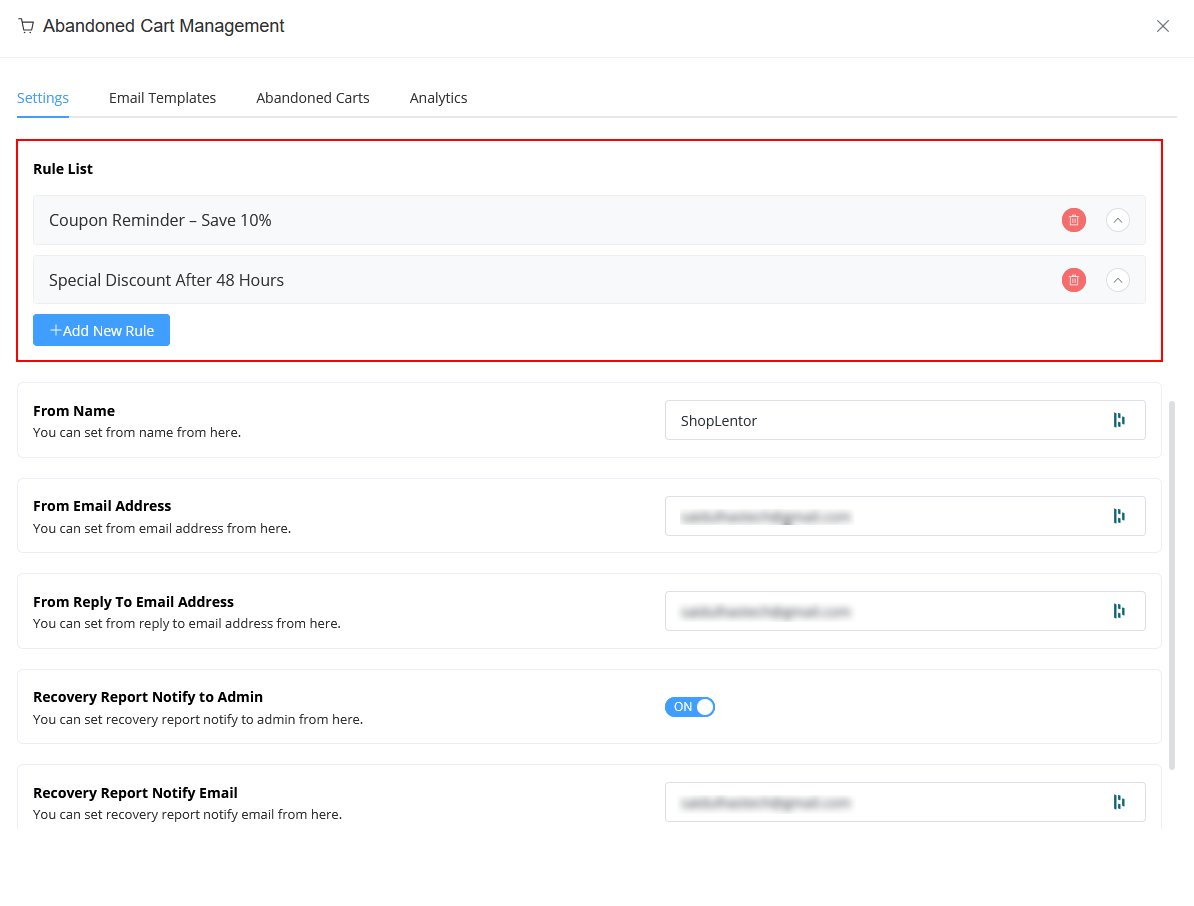
Rules determine when recovery emails are sent after abandonment.
- Go to the Rules section under Settings
- Click Add New Rule
- Rule 1 Configuration (Email at 1 hour):
- Rule Title: “Gentle Reminder – 1 Hour”
- Time Interval: 1 hour
- Email Template: Select or create (see next section)
- Offer: None (save for later emails)
- Save Rule
- Rule 2 Configuration (Email at 24 hours):
- Rule Title: “Value Reminder – 24 Hours”
- Time Interval: 24 hours
- Email Template: Different template with testimonials
- Offer: No discount yet
- Save Rule
- Rule 3 Configuration (Email at 48 hours):
- Rule Title: “Final Offer – 48 Hours”
- Time Interval: 48 hours
- Email Template: Final template with incentive
- Offer: 10% discount or free shipping
- Save Rule
Step 4: Create Email Templates (1 minute)
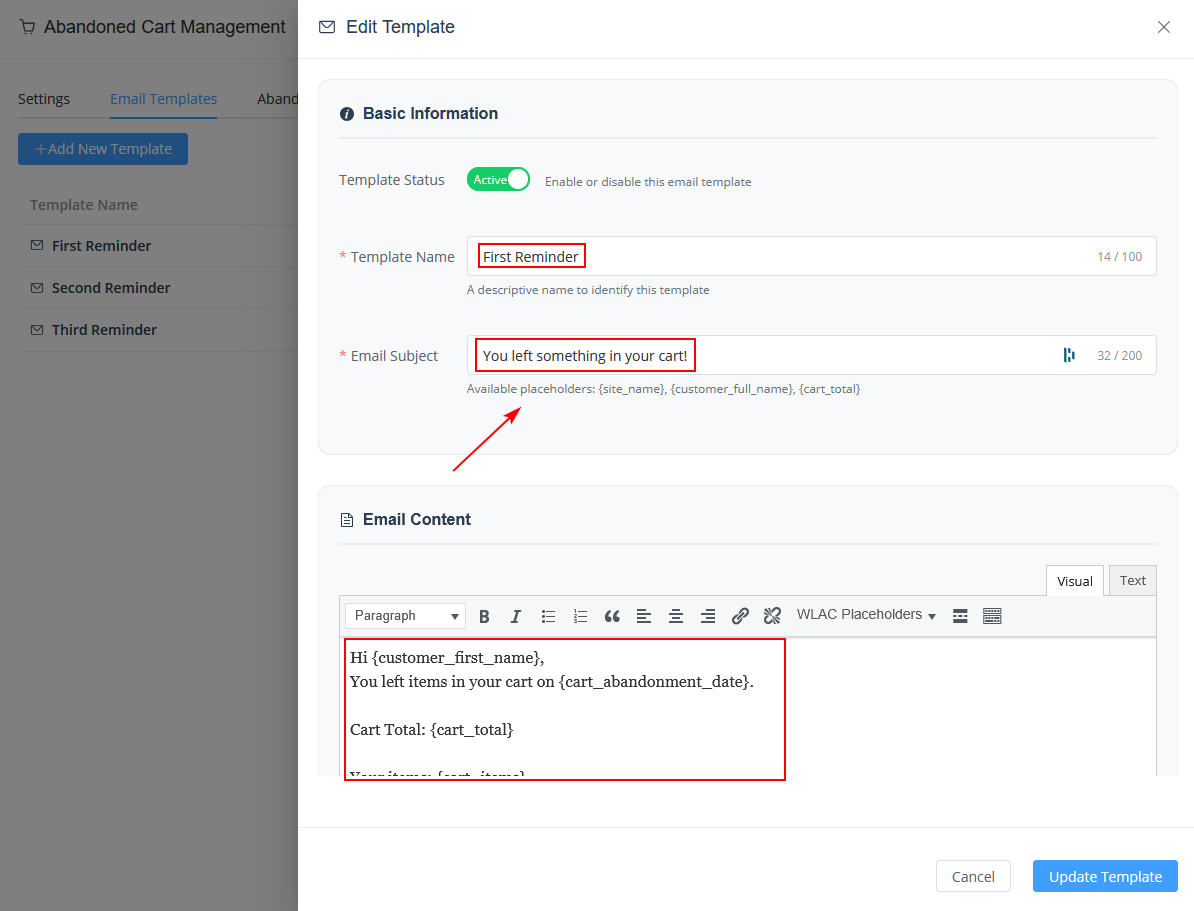
- Go to the Email Templates tab
- Click Add New Template
- Template Configuration:
- Template Name: “Recovery Email 1 – Gentle Reminder”
- Subject Line: “You left [product_name] in your cart, [customer_name]”
- Email Body:
- Greeting: “Hi [customer_name],”
- Message: “You left some great items in your cart. We wanted to make sure you didn’t forget about [product_name]!”
- Include: [product_images] and [cart_total]
- CTA: Include [restore_cart_link]
- Footer: Return policy link, customer service contact
- Coupon Settings (for final email only):
- Discount Type: Percentage or Fixed Amount
- Discount Value: 10% (for high-value carts)
- Expiration: 24 hours
- Auto-generate: Yes (creates unique codes per customer)
- Save Template
Repeat for Email 2 and Email 3 with different copy but the same structure.
Step 5: Monitor Abandoned Carts Tab (Ongoing)
- Go to the Abandoned Carts tab
- View all abandoned carts:
- Customer name
- Email address
- Cart items and total
- Date abandoned
- Recovery status
- Available Actions:
- View full cart details
- Send recovery email manually
- Delete cart record
- Unsubscribe the customer if requested
Step 6: Track Performance in Analytics Tab (Weekly)
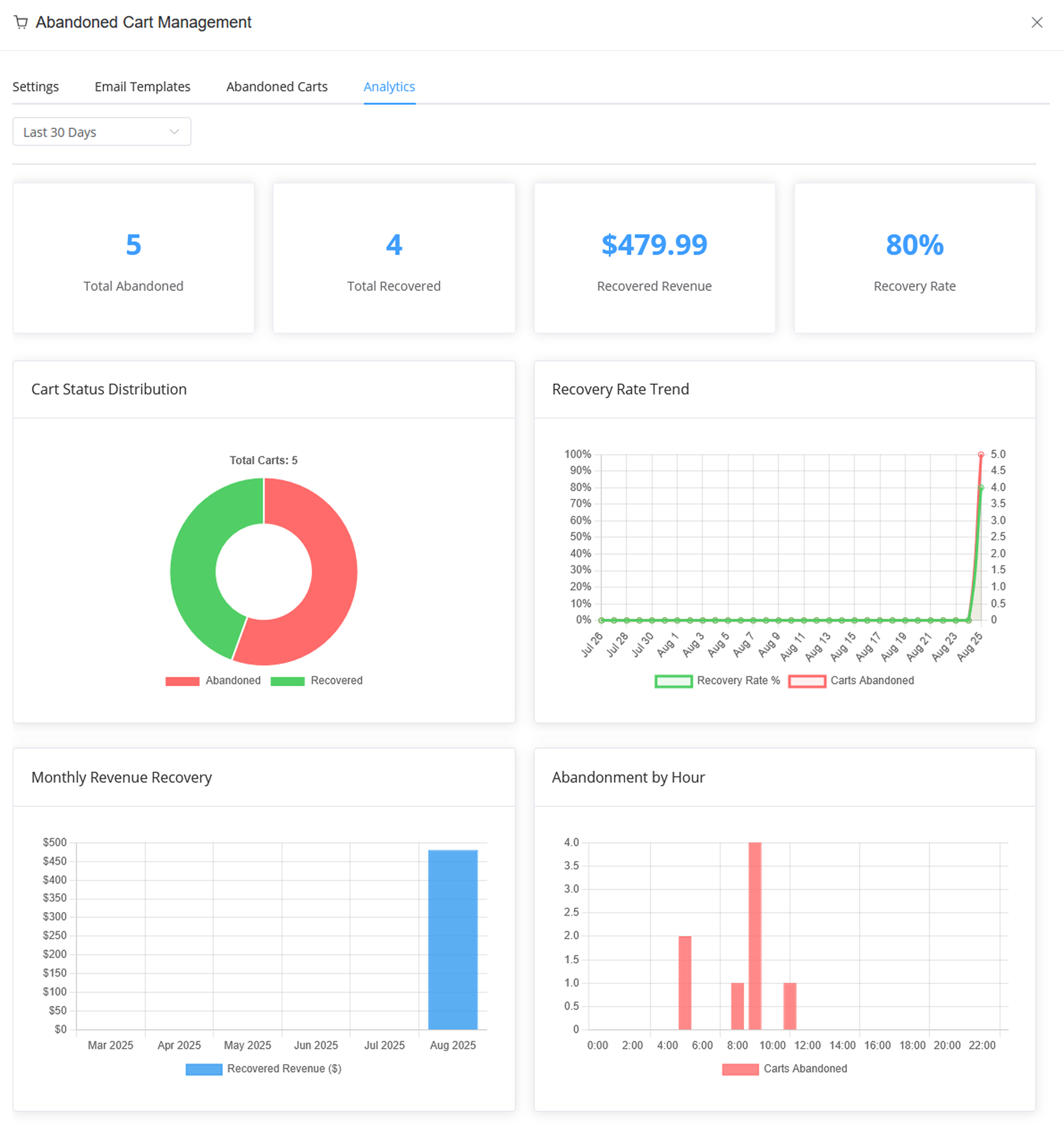
- Go to the Analytics tab
- Key metrics displayed:
- Total Abandoned Carts: Total recovery opportunities
- Recovered Carts: Completed purchases from abandoned carts
- Recovery Revenue: Dollar amount recovered
- Recovery Rate: Percentage of carts recovered
- Trend Chart: Visual of recovery performance over time
- Weekly review process:
- Check if recovery rate is trending toward 10-30% target
- Identify which email generates most conversions
- Monitor revenue recovered vs. cost of discounts offered
- Spot patterns (time of day, customer type, product category)
Expected Timeline to Results:
- Minute 1-5: Setup complete
- Hour 1-24: First recovered carts begin coming in
- Week 1: 15-30 carts recovered (baseline established)
- Week 2-4: Optimization based on data
- Month 2+: Consistent 15-30% recovery rate maintained
Performance Benchmarks After 30 Days:
- Abandoned carts detected: Hundreds to thousands (depending on traffic)
- Recovery rate: 10-30%
- Average recovered order value: Often higher than regular orders
- ROI: 1,400%+ on average (cost of discounts vs. revenue recovered)
Common Abandonment Recovery Mistakes to Avoid
Even well-intentioned store owners make mistakes that dramatically reduce recovery performance.
Mistake #1: Sending Only One Recovery Email
What most stores do: Send a single reminder email, then abandon the effort
What top performers do: Deploy three-email sequences
The Data: Three-email sequences recover 69% more orders than single emails. The first email catches impulse buyers. The second addresses objections. The third uses incentives for final-stage buyers. Each email reaches different psychological states.
Fix: Enable all three reminder rules in ShopLentor immediately. The additional setup effort is minimal; the recovery gains are massive.
Mistake #2: Using Generic, Non-Personalized Subject Lines
What underperforms:
- “Your cart is waiting”.
- “Complete your purchase”.
- “Don’t forget about these items”.
What performs:
- “Sarah, your $127.50 order is waiting”.
- “You left [PRODUCT NAME] behind”.
- “Your order expires in 24 hours”.
The Data: Personalized subject lines increase open rates by 26% and click rates by 41%. That’s not minor optimization; that’s transformative.
Fix: Use ShopLentor’s personalization tokens:
- {customer_name}
- {product_name}
- {cart_total}
- {discount_percentage}
Every email template should include at least one personalization token in the subject line.
Mistake #3: Offering Discounts on All Carts
What erodes margins:
- 10% discount on every abandoned cart recovery
- Trains customers to expect discounts
- Reduces profit on recovered sales
What protects margins:
- Segment by cart value
- No discount on small carts (<$50)
- Free shipping for medium carts ($50-$150)
- Stronger incentives for high-value carts (>$150)
The Data: Blanket discounting reduces margins by 15-20% while only slightly improving recovery rate (5% improvement at best).
Fix: Use ShopLentor’s segmentation features:
- Set up different rules for different cart value ranges
- Apply the discount only to Rule 3 (final email), not all three
- Use tiered discounts instead of flat percentages
Mistake #4: Ignoring Mobile Optimization
The problem: Mobile abandonment reaches 85.65%—the highest across all devices
The mistake: Recovery emails are designed for desktop, not mobile
✅ Mobile optimization requirements:
- Single-column email layout (emails are read at 66% on mobile)
- Large, touch-friendly buttons (44px minimum)
- Minimal text (mobile users scroll less)
- Responsive images (scale properly)
The Data: Mobile-optimized recovery emails achieve 35% higher click rates and 22% higher conversions than desktop-only designs.
Fix: Use ShopLentor’s email template builder. All templates default to a mobile-responsive design. Always preview emails on mobile before sending.
Mistake #5: Excessive Email Frequency (More Than 4 Emails)
What causes damage:
- 5+ emails per abandoned cart sequence
- Sends outside of optimal timing windows
- Results in unsubscribes (cost of acquisition lost)
✅ Optimal frequency:
- 3-4 emails maximum per sequence
- Specific timing (1 hour, 24 hours, 72 hours)
- Multi-channel approach instead of more emails
The Data: More than 4 emails increases unsubscribe rate by 30% while improving recovery by only 2-3% (bad trade-off).
Fix: Stick to three email sequences in ShopLentor. If you want more touchpoints, use SMS or retargeting ads instead of more emails.
Mistake #6: No A/B Testing of Subject Lines
What lazy stores do: Use the same subject line for all campaigns
Cost: 15-25% lower open rates than optimized lines
What smart stores do:
- Test 2-3 subject line variations
- Measure open rates
- Scale the winner
The Data: A/B testing subject lines improves open rates by 15-45%, directly multiplying recovery revenue.
Example A/B Test:
- Version A: “Your cart is waiting.”
- Version B: “Sarah, complete your order and save 10%”
- Send to 50% of the audience each
- Scale Version B if it has a higher open rate
Fix: Use ShopLentor’s A/B testing features (or email marketing platform) to test subject lines on small segments before rolling out to full list.
Advanced Strategy: Exit-Intent Technology
Beyond basic email recovery, sophisticated stores deploy exit-intent technology:
How It Works:
- Tracks when visitor’s cursor moves toward the close button or back button
- Triggers an intervention pop-up in final moments
- Often shows compelling offer: “Wait! 20% off if you complete your purchase now.”
Performance:
- Recovers 20-53% of abandoning visitors before they leave
- When combined with email sequences,it increases total recovery to 35%+
- Best for high-ticket items where 20% discount ROI still works
ShopLentor Integration:
ShopLentor Abandoned Cart pairs well with exit-intent plugins like Elementor popups or dedicated solutions like OptinMonster.
Frequently Asked Questions
Q: What’s the average WooCommerce cart abandonment rate?
A: The average WooCommerce abandoned cart abandonment rate ranges from 70-75%, with mobile reaching 85.65%. This means approximately 7 out of 10 shoppers who add items to their cart leave without purchasing, representing massive lost revenue for online stores. Industry benchmarks show excellent performers achieve rates below 60%.
Q: How many abandoned cart recovery emails should I send?
A: Optimal recovery sequences send 3-4 emails maximum:
1. Email 1: Within 1 hour of abandonment (gentle reminder)
2. Email 2: 24 hours later (address objections)
3. Email 3: 48-72 hours later (time-limited incentive)
Data shows: Three-email sequences recover 69% more orders than single emails. More than 4 emails increases unsubscribes without proportional recovery gains (bad ROI). Most experienced recovery professionals stick to three emails.
Q: What’s a good WooCommerce cart recovery rate?
A: A good recovery rate ranges from 10-30%, with the average around 18%. Top performers achieve 25-30% through personalized sequences, strategic segmentation, and multi-channel approaches. Track your recovery rate monthly to benchmark improvement and identify optimization opportunities.
Q: How much revenue can abandoned cart recovery actually generate?
A: Well-optimized recovery campaigns generate $27 USD average revenue per email sent. With proper setup, a store receives 1,400% average ROI from recovery efforts. For a store generating 1,000 abandoned carts monthly with average cart value of $75:
1. Total recoverable revenue: 1,000 × $75 × 20% recovery rate = $15,000+ monthly
2. After discount costs (15% off): ~$12,750 net revenue
3. This often becomes a store’s highest-ROI marketing channel.
Q: Is ShopLentor the best tool for WooCommerce abandoned cart recovery?
A: ShopLentor offers significant advantages:
1. 100,000+ active installations (market leader)
2. 28% documented abandonment reduction
3. Multi-stage email, SMS, and analytics in one
4. Guest cart capture (recovers non-logged-in users)
5. 3-5 minute setup (no coding required)
6. First recovered cart within 24 hours (most users)
7 1,400% average ROI (documented case studies)
Other quality alternatives exist, but ShopLentor’s combination of power, ease of use, and speed to first result makes it an excellent choice for WooCommerce stores of all sizes.
Q: What’s the best time to send the first abandoned cart email?
A: Send the first recovery email within 1 hour of abandonment. This captures customers while purchase intent remains highest and product memory is freshest. If you wait 24 hours, open rates drop 50%; if you wait 72 hours, customers have likely moved on to competitors.
Q: Can guest checkout really reduce abandonment?
A: Yes, absolutely. Enabling guest checkout reduces abandonment by up to 24%. Forced account creation is one of the top reasons customers abandon carts (26% explicitly cite this). Removing this friction allows new customers to convert immediately; you can request account creation post-purchase when they’re already invested.
Conclusion
The WooCommerce abandoned cart challenge is real: 70-75% of customers leave without purchasing, representing billions in lost revenue annually. But this statistic tells only half the story. The other half is recovery.
The difference between a struggling store and a thriving one often comes down to a single decision: whether they implement systematic WooCommerce abandoned cart recovery strategies. The data proves this approach works.
Multi-channel recovery campaigns reclaim 10-30% of abandoned cart value. Email sequences achieve 50.5% open rates and 21-23% click-through rates, metrics most marketers would celebrate as exceptional. SMS recovery reaches 98% open rates. The ROI averages 1,400%.
These aren’t theoretical numbers. They’re achievable benchmarks for any WooCommerce store willing to implement proven strategies:
- Enable multi-stage email sequences (not single-email approaches)
- Segment customers strategically by cart value and behavior
- Time recovery touches precisely (1 hour, 24 hours, 48-72 hours)
- Personalize aggressively using customer names and product details
- Track metrics obsessively and optimize based on data
- Implement quickly using tools like ShopLentor (3-5 minute setup)
Success doesn’t require complex strategies or advanced technical knowledge. It requires systematic execution of proven methods.
The clearest path to immediate results: Enable ShopLentor’s Abandoned Cart Recovery module today. You can set up your first three-email recovery sequence in under 5 minutes. Most stores see recovered carts within 24 hours. Within 30 days, you’ll have data to optimize further and begin capturing that $260 billion in global recoverable revenue.
Your lost revenue is sitting in your abandoned carts right now. The only question is whether you’ll recover it.
Start recovering abandoned carts today. Enable ShopLentor’s automated recovery solution—no coding required, results guaranteed within 24 hours.