
Show Customers How Close They Are to Free Shipping
A real-time progress bar that nudges shoppers to add just a little more — and rewards them when they hit the threshold. Zero coding. Built right into ShopLentor.
227+
Five star rating
100k+
Active Install
5.5M+
Total Downloads


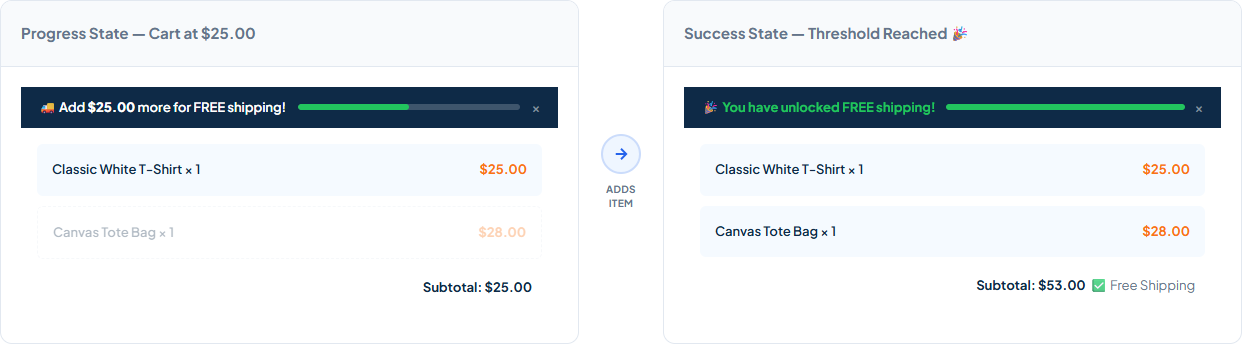
↑ Bar updates in real time via AJAX — no page reload needed

Real-Time Update

Auto-Detect Threshold

Top or Bottom Bar

Custom Messages

Brand Colors

Shortcode Support
See It in Action
See How the Free Shipping Bar Motivates Customers to Spend More
Watch the bar guide shoppers from “almost there” to “free shipping unlocked” — in real time, across any WooCommerce setup.
Why ShopLentor
Why Choose the Free Shipping Bar Module?
Give shoppers the visual motivation they need to spend just a little more — and watch your average order value grow automatically.

Boost Average Order Value
Shoppers who see how close they are to free shipping add more items. Studies show AOV increases up to 30% when a live progress bar is visible.

Reduce Cart Abandonment
Customers leave when they can’t see progress. The bar removes that uncertainty, making the free shipping goal feel reachable and worth chasing.

2-Minute Setup
Enable the module, set your threshold, and go live. ShopLentor auto-detects your WooCommerce shipping zone — no manual calculation needed.

Works With Every Setup
Compatible with Classic cart, WooCommerce Block Cart, Elementor, Gutenberg, and all major themes — including HPOS. No conflicts, no workarounds.

Fully On-Brand
Customise bar background, text, and fill colors from the settings panel. Write your own progress and success messages. Zero CSS required.

Pro Analytics & A/B Testing
Upgrade to Pro for full analytics (impressions, conversions, rate) and A/B message testing — so you can optimise messaging with real data.
Quick Setup
2-Minute Setup for a Higher Average Order Value
Get the Free Shipping Bar live on your store in just a few clicks — no developer, no code.
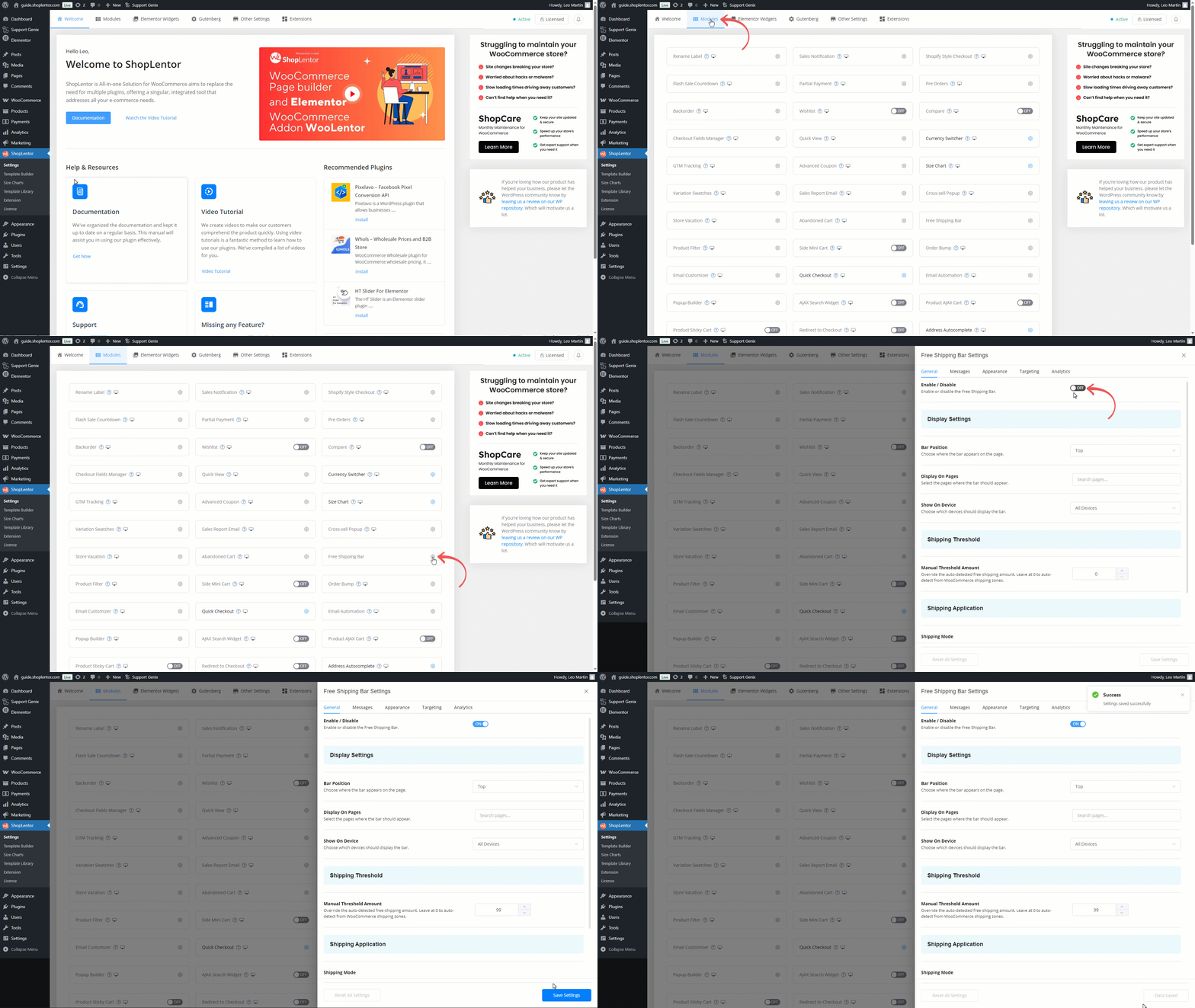
Enable the Free Shipping Bar Module
ShopLentor
Settings
Modules
Locate and enable the Free Shipping Bar module from the list

Configuration
Configure Free Shipping Bar Settings
Fine-tune the module with flexible options to match your store’s needs and maximise conversions.

General Settings — Threshold & Position
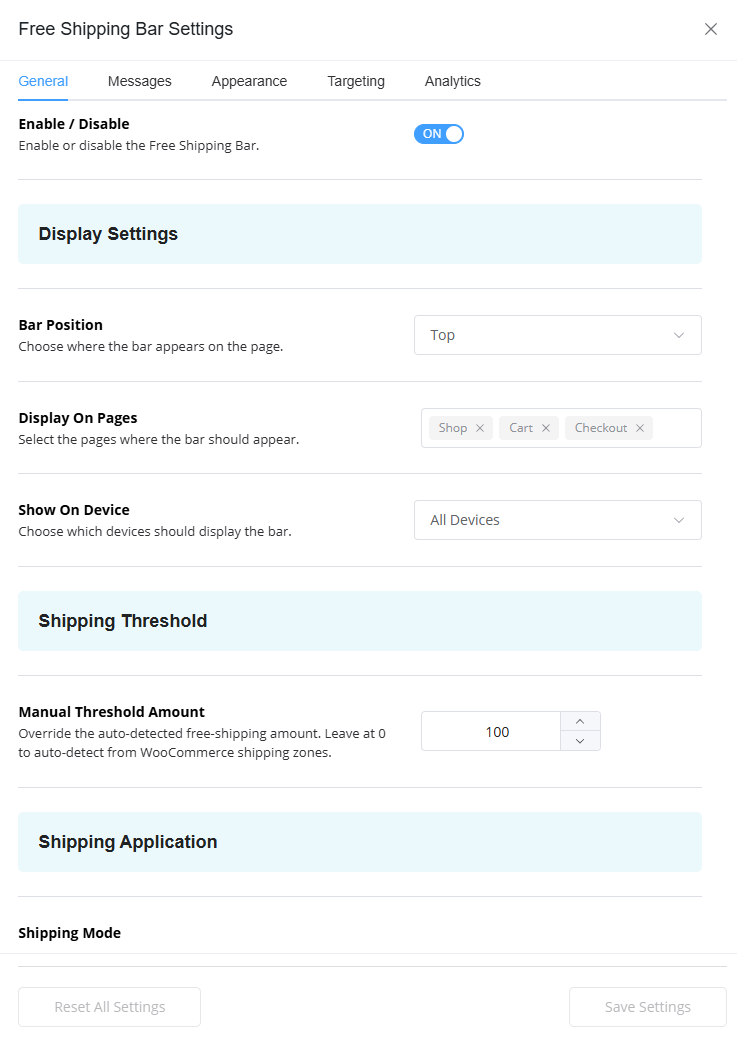
Control where the bar appears and how your free shipping threshold is applied. ShopLentor can auto-detect the threshold from your WooCommerce shipping zones, or you can set a fixed amount manually.
- Bar Position: Fix to the top or bottom of the viewport — automatically offsets for the WordPress admin bar.
- Shipping Mode: Choose Module (apply automatically) — bar applies free shipping itself, no WC method needed — or WooCommerce to read from your shipping zone.
- Manual Threshold Amount: Enter a fixed amount (e.g. 50), or leave at 0 to auto-detect from your WooCommerce shipping zones.
- Hide Other Shipping Methods: In Module mode, hides flat-rate and other methods once the customer qualifies.
- Display On Pages: Search and select specific pages where the bar appears — leave empty for all pages.
- Show On Device: All Devices (default), Desktop Only, or Mobile Only.

Messages — Progress & Success Text
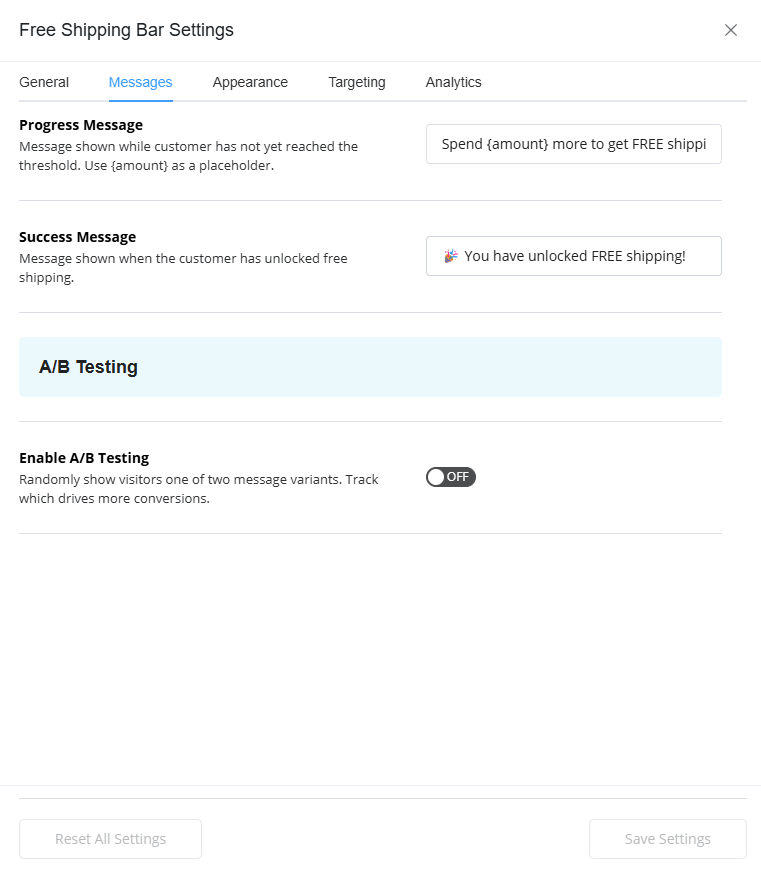
Write the exact words your customers see at every stage of their journey toward free shipping. Full control over both the progress message and the success celebration.
- Progress Message: Uses the
{amount}placeholder — automatically replaced with the formatted remaining amount. - Default progress: “Spend
{amount}more to get FREE shipping!” - Success Message: Shown once the threshold is reached or exceeded.
- Default success: “🎉 You have unlocked FREE shipping!”
- A/B Testing (Pro): Split-test two progress messages. Each visitor sees one variant (50/50, 30-day cookie). Results tracked in Analytics tab.

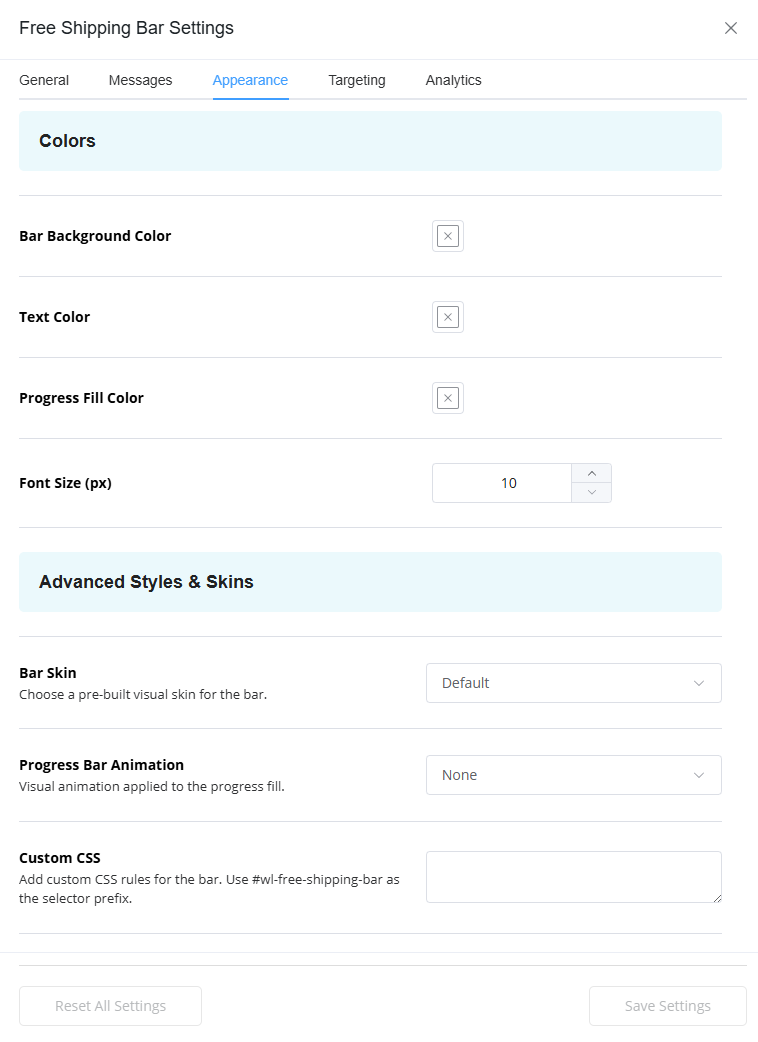
Appearance — Colors, Fonts & Skins
Match the bar to your store’s brand with full color control and font sizing from the settings panel — no CSS required for the essentials.
- Bar Background Color: The background of the entire bar strip.
- Progress Fill Color: Color of the filled portion of the progress bar.
- Font Size: 10–48 px. Leave empty to inherit from the active theme.
- 5 Visual Skins (Pro): Default, Minimal, Gradient, Announcement, Bold — selected from a dropdown.
- Animations (Pro): Slide, Pulse, or Glow effects on the progress fill.
- Cart Drawer / Mini-Cart (Pro): Show a compact bar inside slide-out cart drawers. Theme options: Auto Detect, Flatsome, Astra, OceanWP, Storefront.
- Countdown Timer (Pro): Live clock with end date and custom message — use {timer} as placeholder, e.g. “Offer ends in
{timer}!” - Custom CSS (Pro): Override any style using wl-free-shipping-bar
Impact
Benefits That Make the Free Shipping Bar Essential
Discover how a single progress bar increases AOV, reduces abandonment, and pays for itself on day one.

Higher Average Order Value
Shoppers consistently add more items to reach the free shipping threshold when they can see how close they are.

More Completed Checkouts
The bar gives shoppers a reason to complete their purchase. Cart abandonment drops when the goal feels reachable.

Set Once, Earn Forever
Configure the bar in 2 minutes and let it run automatically. No ongoing maintenance, no manual intervention.

Works Everywhere
Classic cart, Block Cart, Block Checkout, all major themes, all devices — one bar that works across your entire store

Customer Targeting
Show the bar to specific user roles, device types, pages, or even geo-locations (Pro) — so the right customers always see it.

On-Brand Look & Feel
Full color control and 5 Pro skins ensure the bar looks native in your store — not like a third-party widget.
39%
Average AOV Increase
93%
Shoppers Influenced by Free Shipping
100%
Automated — Zero Manual Work
Video Tutorial
See How the Free Shipping Bar Works
Watch a 2-minute demo to discover how this module works. In just a few clicks, you’ll see how it automatically boosts your store’s average order value.
Features
Key Features of the Free Shipping Bar Module
Everything included in the free version — plus powerful Pro upgrades for stores that want to go further.

Real-Time Progress Bar
Updates instantly via AJAX when items are added or removed — no page reload needed, across Classic and Block carts.

Auto-Detect Threshold
Reads your WooCommerce shipping zone automatically. No manual entry required unless you want to override with a fixed amount.

Custom Progress & Success Messages
Write your own messages using the {amount} placeholder for dynamic remaining amounts.

Page & Device Targeting
Show on all pages or specific ones. Restrict to desktop only, mobile only, or all devices — a 768 px breakpoint used.

Module Shipping Mode
Applies free shipping directly — no WooCommerce Free Shipping method required. Optionally hides other methods once qualified.

Shortcode Support
Place the bar anywhere with [woolentor_free_shipping_bar] — works with any page builder or widget area.

5 Visual Skins (Pro)
Default, Minimal, Gradient, Announcement, and Bold — each changes the full bar aesthetic to match any store style.

Countdown Timer (Pro)
Add a live countdown clock inside the bar for time-limited free shipping offers. Use the {timer} placeholder, e.g. “Offer ends in {timer}!”
Our Users Share Their Experience
Read what store owners say about our module’s impact on their business efficiency and customer satisfaction.
5.0

Super fast assistance!
I’m very impressed with the speed of the support team. I had a request to remove a category label, and they not only replied quickly but also logged in to fix it for me. Everything works perfectly now. Thanks for the great help!

mrrick97
(@mrrick97)
18 Dec 2025
5.0
Friendly and professional support
I sent an email to inquire about the Display in ShopLentor Plugin issue. I received a quick reply and the issue was resolved. Thank you very much.

raycksh
(@raycksh)
14 May 2025
5.0
Awesome software with great support
Great product all round with awesome backup service. Thanks for the assistance chaps.

ryanduncan
(@ryanduncan)
24 Feb 2025
5.0
Great Plugin, with Great support
The plugin works flawlessly, And when i faced some issue with some elements not rendering properly their support was prompt in helping me out, really satisfied with their service.

swrnvnams
(@swrnvnams)
27 Apr 2025
5.0
Best Plugin ever
The best plugin with all functions for woocommerce!
I loved it and also their support team is very helpful!
Thanks a lot!

ericreates
(@ericreates)
24 Feb 2025
5.0
Good One.
Good plugin works well with Elementor Pro. Supports custom template builder with ACF Fields which is very productive in creative development with less coding. Thanks to the development team.

webtinker
(@webtinker)
17 Jan 2025
Related Modules
Enhance Your Store With Related Modules
Discover powerful modules that complement the Free Shipping Bar for maximum conversions and higher order value.

Abandoned Cart
Recover lost sales with smart reminders that bring customers back.
Key Features
- Automated recovery emails
- Dynamic coupon codes
- Revenue analytics

Flash Sale Countdown
Create urgency with limited-time offers
Key Features
- Live countdown timer
- Scheduled sale pricing
- Urgency-driven conversions

Order Bump
Increase average order value with strategic upsells
Key Features
- One-click upsell offers
- Smart product recommendations
- Customizable offer display
- A/B testing capabilities

Side Mini Cart
Sliding cart panel for quick checkout access
Key Features
- AJAX cart updates
- Quick quantity changes
- Checkout shortcuts
FAQ
Frequently Asked Questions
Find answers to common questions about the Free Shipping Bar module and learn how to get the most out of it.
Do I need a WooCommerce Free Shipping method set up?
Not necessarily. In Module mode, ShopLentor applies free shipping automatically when the cart reaches the threshold — no WooCommerce shipping method required. In WooCommerce mode, the bar reads the threshold from your existing shipping zone configuration.
Can I show a different threshold to customers in different countries?
Yes — with Geo-Targeting (Pro). ShopLentor automatically detects the customer’s WooCommerce shipping zone and shows the matching threshold for their location. No manual country configuration needed.
Can I place the bar inside a page builder section rather than at the top/bottom?
Yes. Use the [woolentor_free_shipping_bar] shortcode to place the bar anywhere on the page. In that context it renders inline (not fixed) and sits exactly where you drop it. Works with any page builder, widget area, or template.
Will the bar slow down my store?
No. Assets load only on pages where the bar is configured to appear. The AJAX cart update is a single lightweight request triggered only when the cart changes — no polling, no constant background requests.
Start Boosting Your Average Order Value Today!
Simplify conversions with a real-time progress bar that motivates shoppers and rewards them when they qualify. Get started for free — no credit card required.