Quick answer: Where should you place WooCommerce cross-sells?
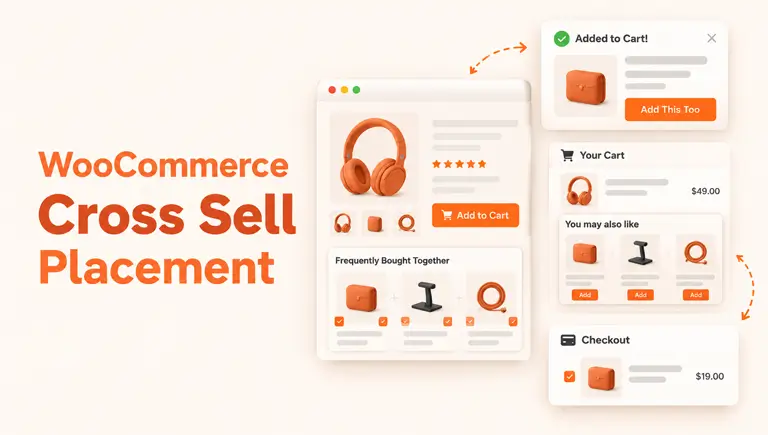
The best WooCommerce cross sell placement depends on the shopper’s stage. Use product pages for add-ons that complete the item. Use the cart page for small extras. Use a popup after add-to-cart for one focused offer. Use checkout for simple order bumps. Show three to four relevant offers, then test.
WooCommerce cross sell placement affects whether your offers get seen or ignored. Many stores add cross-sell products but never check where those offers appear.
The same offer can work in one spot and fail in another. This guide shows where each placement fits, what to offer there, and how to test it.
Table of Contents
What is WooCommerce cross sell placement?
It is the spot in your store where you show complementary products. A phone case next to a phone is one example.
The offer matters, but so does timing. A shopper comparing products thinks differently from one who is ready to pay. Good placement matches the offer to that moment.
If you need the basics first, read what upselling and cross-selling mean. For strategy, see this WooCommerce upsell strategy guide.
Cross-sells, upsells and related products in WooCommerce
These three are often mixed up. WooCommerce treats them differently, according to its official documentation.
| Type | What it does | Default location | Example |
|---|---|---|---|
| Cross-sell | Suggests a complementary item | Cart page | Laptop + mouse |
| Up-sell | Suggests an alternative, usually higher quality or price | Product page (depends on theme) | Standard blender → premium blender |
| Related products | Auto-generated from shared categories and tags | Product page | Other items in the same category |
You set cross-sells and up-sells by hand in each product’s Linked Products tab. Related products need no setup.
The default cross-sell spot is the cart. It works, but it comes late. Shoppers who have decided may scroll past it, as Barn2 also points out.
Your theme can change what displays. If cross-sells don’t appear, check theme template overrides, out-of-stock products, and plugin conflicts.
For more detail, see how WooCommerce cross-sell works.
Why placement matters?
Shoppers leave carts often. Baymard Institute’s average cart abandonment rate is 70.22%, based on 50 studies. Its page was last updated in September 2025.
Recommendations can also matter. A 2017 Salesforce study of 150 million sessions, reported by Practical Ecommerce, found that about 7% of visitors clicked recommendations. Those visits made up 26% of revenue.
Treat that number as a direction, not a promise. It is old, and people who click suggestions were likely ready to buy already.
The goal is not more offers. It is the right offer at the right step.
Cross sell placement options, compared
| Placement | Shopper mindset | Best offers | Main risk |
|---|---|---|---|
| Product page | Still deciding | Add-ons that complete the item | Distracting from the main product |
| Cart page | Ready to buy | Low-cost, related extras | Too many choices |
| Popup after add-to-cart | Just made a choice | One or two relevant items | Feeling pushy |
| Checkout | About to pay | Very small add-ons | Slowing the checkout |
| Thank-you page | Purchase done | Related products for later | Low impact if generic |
Starting points by store type (ideas to test, not proven rules)
| Store type | Try first | Why |
|---|---|---|
| Fashion | Product page + cart | Shoppers build outfits, so pairing items fits browsing. |
| Electronics | Product page + popup after add-to-cart | Accessories are tied to one device. |
| Everyday consumables | Cart + checkout | Small refills or add-ons are easy to accept at the end. |
| Digital products | Checkout | Nothing ships, so a small add-on adds little friction. |
These are reasoned starting points. Your own results should decide.
Where to place cross-sells, one by one
Product page
The shopper is still choosing. Offer items that make the main product work better, like a screen protector for a phone.
Place the offer near the add-to-cart area. Don’t compete with the main product’s photos and price.
Cart page
This is WooCommerce’s default spot. Shoppers here are close to buying, so small extras work well.
Choose items priced well below the main product. Show three to four items, not a full grid.
Popup after add-to-cart
A popup catches the shopper at the moment of choice. It works best with one to three items.
Avoid popups that appear on every action. Give shoppers room to continue.
Checkout page
Checkout is sensitive. Nearly 1 in 5 shoppers abandon because checkout is too long or complicated, according to Baymard.
Keep checkout offers tiny and one-click. An order bump, a small add-on near payment, is a common format. If your checkout is already heavy, skip this placement.
Thank-you page
The order is done, so there is no risk to the sale. Use this spot for related products the shopper may want next time. Keep it soft.
How to choose products for each placement
- Product page: Shoppers are still comparing, so a somewhat pricier accessory can make sense. Test it.
- Cart page: Start with low-cost items that clearly match the cart.
- Popup: Pick one strong match, not a list.
- Checkout: Keep add-ons very small, so the total barely changes.
- Everywhere: Use in-stock products only, and keep offers short on mobile.
- How many: Start with three to four relevant items. Adjust based on your store and test results.
Example scenario (illustration, not a case study)
Imagine a store that sells coffee machines.
- Product page: a descaling kit under the add-to-cart button.
- Popup after add-to-cart: one offer for a set of filters.
- Cart page: two small items, like a cleaning brush or cup set.
- Checkout: one tick-box for a filter refill pack.
Each spot has a different job. None repeats the same offer.
ShopLentor- WooCommerce Builder for Elementor & Gutenberg
A versatile page builder to build modern and excellent online stores with more than 100k+ Active Installations.
How to set up cross-sell placement with ShopLentor
WooCommerce handles basic cross-sells. Controlling where and how those offers appear usually takes extra customization. ShopLentor lets you build those placements visually, without code.
- Set the products. Go to Products > Edit product > Linked Products > Cross-sells.
- Design the cart page. Use ShopLentor’s cart page builder to add a cross-sell products widget where shoppers will see it.
- Add a popup. The Smart Cross-Sell Popup module lets you pick when it shows: after add-to-cart, on exit intent, after a time delay, at a scroll point, at a cart total, or before checkout. It can pull from WooCommerce cross-sells, up-sells, related products, or products you choose. The setup doc has the steps.
- Add a checkout offer. Use Order Bump for a small add-on near payment.
Some cart, checkout, and popup features depend on your plan. Check the Free vs Pro comparison before you plan your setup.
How to test what works
- Pick one goal. Average order value is a good start.
- Change one placement at a time. Otherwise you won’t know what worked.
- Run it for a few weeks. Short tests give noisy results.
- Watch checkout drop-off. If it rises, your offer is adding friction.
- Keep what wins, then repeat.
Common mistakes
- Showing the same offer on every page.
- Promoting expensive items as small add-ons.
- Showing too many products at once.
- Adding checkout offers to an already slow checkout.
- Never checking results.
Conclusion
Good cross sell placement is about timing. Product pages help decisions, carts catch small extras, popups create a quick nudge, and checkout should stay light.
Start with the cart page and one product-page spot. Test, then expand. When you want more control, ShopLentor’s cart builder, popup module, and order bump cover these placements.
Frequently Asked Questions
Where is the best place to show cross-sells in WooCommerce?
There is no single best spot. The cart page and product page are strong starting points. Add a popup or checkout offer once those work.
Where does WooCommerce show cross-sells by default?
In the cart, based on products you set in the Linked Products tab. Your theme can change how it looks.
How many cross-sell products should I show?
Start with three to four relevant products. The right number depends on your store type, product range and test results.
Are cross-sells and upsells the same?
No. Cross-sells suggest complementary items. Upsells suggest a better or pricier alternative. See this comparison.
Do popups hurt the customer experience?
They can if they appear too often or block the screen. Use one focused offer at a clear moment, like after add-to-cart.
Should I add cross-sells at checkout?
Only if the offer is small and easy. Checkout friction can raise abandonment.
Why are my cross-sells not showing?
Common causes are out-of-stock products, theme template overrides, and plugin conflicts. Test with a default theme to check.