Quick Answer: The fastest way to increase order value in WooCommerce is to combine three tactics — pre-purchase upsells on the product page, cross-sells in the cart, and post-purchase offers after checkout. The exact revenue lift varies by store, offer relevance, and pricing, but AOV optimization is one of the highest-leverage levers available because it doesn’t require new traffic or ad spend.
A WooCommerce upsell strategy works by showing the right offer to the right customer at the right stage of their buying journey. You don’t need more traffic to make more money — you need to extract more value from the traffic you already have.
Table of Contents
What Is a WooCommerce Upsell Strategy?
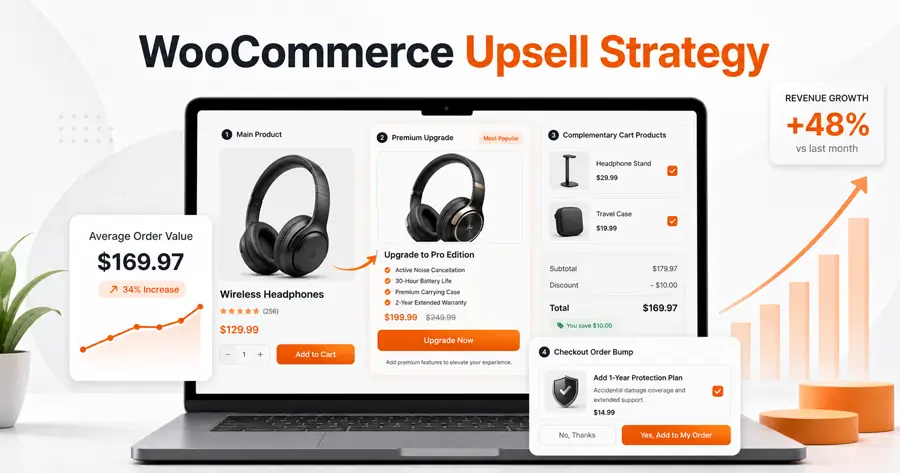
A WooCommerce upsell strategy is a deliberate plan for encouraging customers to buy a more expensive version of a product, add complementary items, or purchase in greater quantity — increasing average order value (AOV) without needing new customers. AOV is calculated as total revenue divided by the number of orders, so even a small increase in per-order spend compounds across your store.
Upselling differs from cross-selling in one key way: upselling moves a customer up the product ladder toward a better version of the same item, while cross-selling expands the width of their cart with complementary products. A strong strategy uses both together.
Why Order Value Matters More Than Traffic
Acquiring a new customer is widely reported to cost more than retaining or growing revenue from an existing one — Harvard Business Review notes that, depending on the study and industry, acquiring a new customer can be anywhere from five to 25 times more expensive than retaining an existing one.
This is a cost comparison, not a direct upselling profit multiplier, but it explains why AOV optimization is especially valuable for stores with limited acquisition budgets: you’re increasing revenue from traffic you’ve already paid to acquire.
A Simple AOV Calculation
Say your store processes 100 orders a month at a $50 average order value — that’s $5,000 in monthly revenue. If upsells and cross-sells lift your AOV to $56, the same 100 orders now generate $5,600, a $600 increase with no added ad spend or traffic.
The actual lift you’ll see depends on offer relevance, pricing, and placement, so treat this as a framework for measuring impact, not a guaranteed outcome.
Where to Place Upsells in the WooCommerce Buyer Journey
| Stage | Upsell Type | Why It Works |
|---|---|---|
| Product page | Premium version, add-ons | Customer is still deciding, open to a better option |
| Cart page | Cross-sells, “frequently bought together” | Customer has committed to buying, easy to add more |
| Checkout | Order bumps (small, low-friction add-ons) | Reduces decision fatigue with one-click add |
| Thank-you/post-purchase | Follow-up offer (where supported) | Purchase intent is confirmed |
| Follow-up email | Cross-sell or replenishment offer | Re-engages after the sale is complete |
Upselling tends to work best during product selection, while cross-selling performs well at the cart and checkout stage, when shoppers are already committed to buying.
Note: True one-click post-purchase upsells — where a customer accepts an offer without re-entering payment details — depend on a compatible upsell extension and a payment gateway that supports saved payment tokens. This is not a default WooCommerce core capability, so check compatibility before promising this experience to customers.
9 Practical Tactics to Increase Order Value
1. Use WooCommerce’s Native Linked Products
WooCommerce includes a built-in Linked Products feature. Go to Products > [select a product] > Product Data > Linked Products, then add items under “Upsells” (shown on the product page) or “Cross-sells” (shown on the cart page). This is free and works out of the box, though it’s manual per product and offers no built-in analytics.
Freshness note: If your store uses WooCommerce's newer block-based cart, cross-sells are increasingly powered by the Product Collection block's Cross-Sells collection rather than the older standalone Cart Cross-Sells block, which WooCommerce began soft-deprecating starting with version 10.2. Existing setups keep working, but new stores default to the newer block.2. Recommend a Genuinely Better Option, Not Just a Pricier One
The upsell should make the customer’s original choice better — a larger size, extended warranty, or upgraded material. If the offer doesn’t add clear value, customers see through it and trust drops.
3. Bundle Complementary Products
Bundling a core item with accessories creates a natural cross-sell that feels like a service rather than a sales pitch. Keep bundle discounts modest enough to protect margin — a common approach is pricing the bundle just below the sum of individual items rather than steeply discounting it.
4. Add Order Bumps at Checkout
An order bump is a small, low-cost, one-click add-on shown before order submission — for example, “Add gift wrapping for $3.” Because it requires minimal decision-making, these tend to convert well, though the exact lift depends heavily on price point and relevance. Test the offer against a control period rather than assuming a fixed percentage increase.
5. Offer a Relevant Follow-Up After Purchase
Where your stack supports it, show a single relevant offer after checkout completes, or follow up by email shortly after. Keep the offer related to what was just purchased and consider a short-lived discount to add urgency.
6. Use a Free Shipping Threshold
Setting a free-shipping minimum just above your current AOV nudges shoppers to add one more item to qualify — a widely used AOV tactic because it feels like a reward rather than a sales push.
7. Personalize Recommendations With Purchase Data
Recommendations based on browsing or purchase history tend to outperform static “you might also like” widgets. If your store has enough order history, prioritize dynamic recommendations tied to what’s actually in the cart.
8. Show Social Proof Next to the Offer
Adding a short review or rating beside an upsell can increase buyer confidence, particularly for higher-priced upgrades where the price jump is more noticeable.
9. A/B Test Placement, Price, and Copy
Not every audience responds the same way. Test upsell placement, discount depth, and offer count, and track acceptance rate (accepted offers ÷ displayed offers) on each specific placement rather than judging by overall revenue alone.
Exclude Products Customers Already Own
Avoid showing an upsell or cross-sell for an item already in the customer’s order or purchase history — it looks careless and undermines the “curated recommendation” feel. Most linked-product setups and popup tools let you scope offers by category or exclude specific SKUs; use that filtering rather than showing a blanket recommendation set to everyone.
How Many Offers to Show (and Where on Mobile)
Limiting displayed items to three or four keeps the offer focused rather than overwhelming — this is a common best practice among cross-sell popup tools. On mobile, favor a single, prominent offer over a multi-item carousel; smaller screens punish clutter more than desktop layouts do, so simplify rather than compress the same desktop layout.
Example Workflow: A Skincare Store Increasing AOV
Imagine a WooCommerce store selling a $28 facial cleanser. On the product page, it offers a “starter set” upgrade with a toner for $42 — an upsell. In the cart, it cross-sells a $14 travel-size moisturizer as “frequently bought together.”
At checkout, it adds a $2 order bump for gift wrapping. This layered approach — combining product-page, cart, and checkout offers — reflects how ecommerce upsell workflows are typically structured to compound rather than duplicate each other.
Native WooCommerce Tools vs. Upsell Plugins
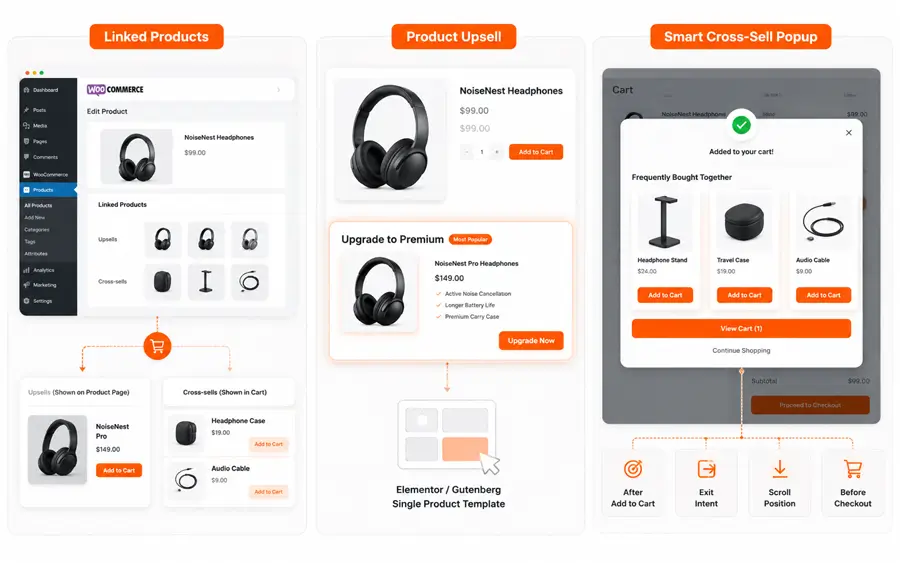
WooCommerce’s built-in Linked Products feature is a practical starting point for basic upselling and cross-selling. However, it requires manual product assignment and does not include advanced design controls, automated triggers, or detailed performance tracking.
| Feature | WooCommerce Linked Products | ShopLentor Product Upsell | ShopLentor Smart Cross-sell Popup |
|---|---|---|---|
| Primary purpose | Display manually assigned upsells and cross-sells | Display styled upsell products on custom single-product templates | Show targeted product recommendations through popups |
| Setup type | Manual product assignment | Drag-and-drop widget | Trigger-based popup configuration |
| Supported builders | WooCommerce product and cart templates | Elementor and Gutenberg | WooCommerce stores using ShopLentor |
| Product sources | Manually assigned upsells and cross-sells | WooCommerce-linked upsell products | Cross-sells, upsells, related products, or selected categories |
| Display location | Product and cart pages | Single Product Template | After add-to-cart, on exit intent, at a scroll position, or before checkout |
| Design flexibility | Limited | Customizable widget layout | Customizable popup layout |
| Analytics | No built-in analytics | Depends on the selected setup | Basic statistics in Free and detailed analytics in Pro |
| Free-version limits | Included in WooCommerce core | Feature availability depends on the ShopLentor plan | Displays up to four products |
| Pro capabilities | Not applicable | Advanced capabilities vary by plan | Unlimited products, smart filtering, and detailed analytics |
ShopLentor provides a Product Upsell widget for Elementor and Gutenberg, used specifically on the Single Product Template to display WooCommerce-linked upsell products in a styled, drag-and-drop layout.
Separately, its Smart Cross-sell Popup module can trigger product recommendations after add-to-cart, on exit intent, at a scroll position, or before checkout, and pulls product suggestions from WooCommerce’s cross-sells, upsells, related products, or manually chosen categories.woolentor+1
Native WooCommerce tools are suitable when you only need simple, manually assigned recommendations. ShopLentor becomes more useful when you need greater control over layout, popup timing, product filtering, and performance tracking.
When customizing product, cart, or checkout experiences with Elementor or Gutenberg, these tools can help you place relevant offers where they naturally support the customer’s buying decision.
Common Mistakes That Hurt Upsell Conversion
- Showing irrelevant products that don’t relate to the item in the cart
- Overloading the customer with too many offers at once (stick to 3-4 max)
- Interrupting checkout with a slow-loading popup
- Pricing the upsell too close to the original item, reducing perceived value
- Recommending items the customer has already purchased
- Never testing placement, so underperforming offers stay live indefinitely
What Metrics Should You Track?
AOV alone doesn’t tell the whole story. A more complete measurement set includes:
- Upsell acceptance rate: accepted offers ÷ displayed offers
- Incremental revenue: additional revenue directly attributed to accepted offers
- Revenue per visitor: useful when conversion rate and AOV move in opposite directions
- Gross profit per order: more meaningful than revenue alone, since some upsells carry thinner margins
- Checkout completion rate: flags whether aggressive offers are creating friction
- Refund rate: identifies poorly matched or low-quality add-ons
- Items per order: especially useful for bundles and cross-sells
- Offer-specific conversion rate: compares each placement (product page vs. cart vs. checkout) independently
Upsell Launch Checklist
- Enable native WooCommerce Linked Products or a dedicated plugin
- Choose one upsell for the product page and one cross-sell for the cart to start
- Exclude already-purchased items from recommendations
- Set discount or bundle pricing that protects margin
- Limit displayed offers to 3-4 items, fewer on mobile
- Track acceptance rate and AOV for at least 2-4 weeks before adding more offer types
- A/B test one variable at a time (placement, price, or copy)
ShopLentor- WooCommerce Builder for Elementor & Gutenberg
A versatile page builder to build modern and excellent online stores with more than 100k+ Active Installations.
Frequently Asked Questions
What is the difference between upselling and cross-selling in WooCommerce?
Upselling encourages a customer to buy a higher-priced or upgraded version of the product they’re already considering. Cross-selling suggests a separate, complementary product to add to the same order.
Does WooCommerce have built-in upsell features?
Yes. Under Products > Linked Products, you can manually assign upsells and cross-sells for each product without installing a plugin. Note that WooCommerce’s cart cross-sell display is transitioning to the Product Collection block, so exact placement controls may differ depending on your store’s setup.
Where should I place upsell offers for the best results?
Product pages tend to work well for upsells during decision-making, cart and checkout pages work well for cross-sells and order bumps, and post-purchase or follow-up offers can work where your plugin and payment gateway support them.
Is it true that upselling generates a fixed percentage of ecommerce revenue?
There’s no single reliable figure that applies across all stores — results vary considerably by product type, offer relevance, pricing, and traffic quality. Treat any published percentage as a general anecdote rather than a guaranteed outcome for your store.
Do I need a plugin to run an effective upsell strategy?
Not strictly — WooCommerce’s native Linked Products feature covers basic upselling. Plugins like ShopLentor add design flexibility, popup triggers, and performance tracking that make testing and scaling offers easier, with feature depth varying between free and Pro versions.
What’s an order bump and how is it different from a regular upsell?
An order bump is a small, low-cost, one-click add-on shown at checkout, designed to require minimal decision-making. Regular upsells are typically shown earlier, on the product or cart page, and involve a bigger price jump.
How do I know if my upsell strategy is actually working?
Track more than AOV alone — monitor acceptance rate, incremental revenue, gross profit per order, and checkout completion rate to confirm the offers are adding value without creating friction or hurting margin.
Conclusion
Start with one relevant product-page upsell and one cart cross-sell, then measure acceptance rate and AOV before layering in checkout or post-purchase offers. A smaller, well-matched offer system is usually easier to optimize than showing multiple recommendations at every stage of the journey, and it gives you a clean baseline to test against as you expand.