
The Product Reviews Block for Gutenberg in ShopLentor allows you to display WooCommerce Product Reviews directly within the WordPress block editor. It helps store owners showcase real customer feedback, ratings, and review content anywhere on their website.
Displaying WooCommerce Product Reviews builds trust and credibility for your products. When visitors see authentic feedback from previous customers, it increases confidence and encourages them to make purchasing decisions.
This block automatically pulls WooCommerce Product Reviews from your store and displays them with customizable layout and styling options, making it easy to highlight customer experiences on product pages, landing pages, or promotional sections.
How to Enable the Product Reviews Block
Before using the block, make sure it is enabled in ShopLentor settings.
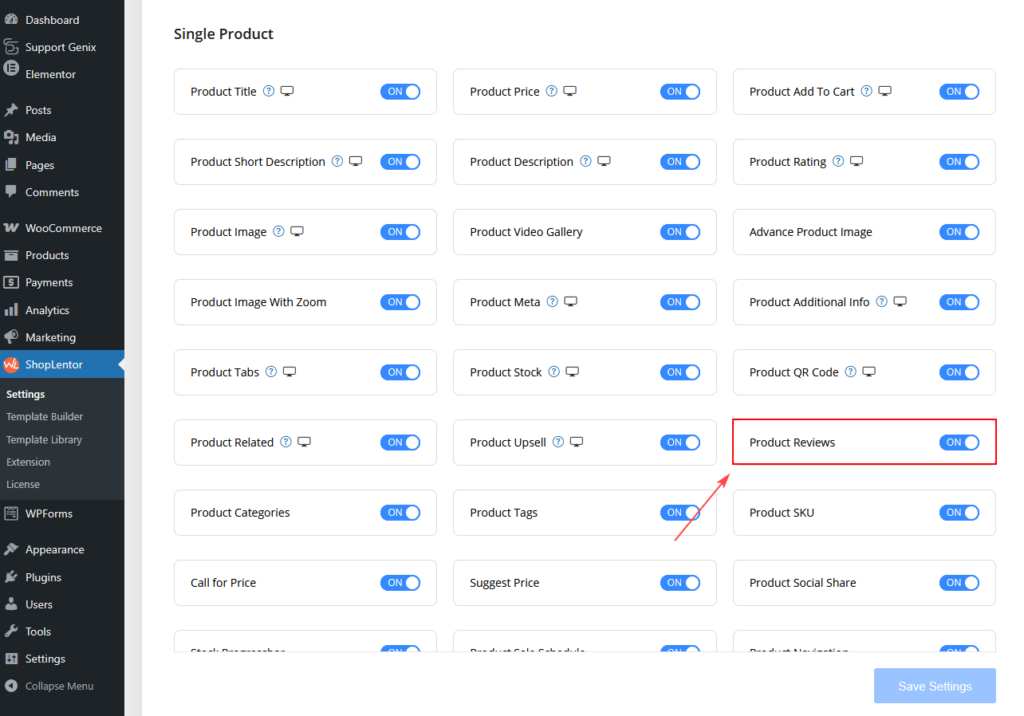
Step 1: Enable the Block
- Go to WordPress Dashboard
- Navigate to ShopLentor → Settings
- Open the Gutenberg Blocks section
- Find Product Reviews
- Turn ON the block
- Click Save Settings
Once enabled, the block will be available inside the Gutenberg editor.
How to Add the Product Reviews Block
After enabling the block, you can add it to any page or post using the block editor.
Step 2: Add the Block in Gutenberg
- Open the page or post in WordPress Block Editor
- Click the + (Add Block) button
- Search for Product Reviews
- Select the Product Reviews Block
- Insert it into your page layout
Once added, the block will automatically pull product reviews from WooCommerce.
Product Reviews Block Settings
After adding the block, several settings become available to customize how reviews appear.
Product Selection
This option allows you to select which product reviews should be displayed.
Product
Choose the WooCommerce product whose reviews you want to show.
This makes the block ideal for:
- Product landing pages
- Promotional pages
- Sales campaigns
- Product highlight sections
Review Layout Settings
These options control how reviews appear on the page.
Reviews Per Page
Define how many reviews will appear in the block.
Example values:
- 3 reviews
- 5 reviews
- 10 reviews
Showing fewer reviews helps keep layouts clean and focused.
Review Order
Control how reviews are sorted.
Common options include:
- Latest reviews first
- Oldest reviews first
- Highest rating first
Sorting reviews helps highlight the most relevant feedback.
Show Rating
Enable or disable the star rating display.
When enabled, customers will see:
- Star rating
- Average rating score
This makes reviews easier to scan and improves credibility.
Show Reviewer Name
Enable this option to display the name of the customer who wrote the review.
Displaying reviewer names improves trust and authenticity.
Show Review Date
This option displays the date when the review was submitted.
Showing the review date helps customers see how recent the feedback is.
Style Customization
The Product Reviews Block provides styling controls so you can match the design of your store.
Review Container
Controls the overall appearance of the review box.
- Background Color
- Choose a background color for the review container.
- Border
- Set the border style around each review.
- Examples:
- Solid
- Dashed
- None
- Border Radius
- Adjust the roundness of the review container corners.
- Padding
- Controls the spacing inside the review box.
- Margin
- Controls the space between multiple reviews.
Review Text
Customize the appearance of the review content.
Typography
Adjust text style including:
- Font size
- Font weight
- Line height
- Letter spacing
Text Color
Choose the color for the review text.
Reviewer Name
Customize how the reviewer name appears.
Options include:
- Typography settings
- Color selection
- Font size adjustments
Rating Stars
Customize the appearance of the rating stars.
- Star Color
- Set the color of active stars.
- Star Size
- Adjust the size of the rating stars.
- This allows the rating system to better match your store design.
Pagination Options
If there are many reviews, pagination helps organize them.
Pagination Type
Choose how reviews load.
Options include:
- Numbered pagination
- Load more button
Pagination keeps the page clean and improves user experience.
Responsive Behavior
The Product Reviews Block is fully responsive and adapts to different screen sizes.
- Desktop
- Displays full review layout with ratings, reviewer name, and content.
- Tablet
- Adjusts spacing and font size for better readability.
- Mobile
- Optimizes the review layout for smaller screens while keeping the design clean and easy to read.
Best Practices for Using Product Reviews
To get the best results from the Product Reviews Block:
Display Reviews on Sales Pages
Adding reviews to landing pages helps increase customer confidence.
Highlight Positive Feedback
Show the best customer experiences to build trust.
Limit the Number of Reviews
Displaying 3–5 reviews keeps the design clean and effective.
Combine Reviews with Product Grids
Using reviews alongside product displays creates a stronger shopping experience.
When to Use the Product Reviews Block
The block works best in the following scenarios:
- Product landing pages
- Promotional campaigns
- Homepage product sections
- Product comparison pages
- Trust-building sections
Displaying real customer feedback can significantly improve conversion rates.
Troubleshooting
Reviews Not Appearing
Make sure:
- WooCommerce reviews are enabled
- The selected product has reviews
- The correct product is selected in the block settings
Ratings Not Displaying
Check that the Show Rating option is enabled in the block settings.
Summary
The WooCommerce Product Reviews Block in ShopLentor allows you to display real customer feedback directly inside Gutenberg pages. It helps build trust, improve credibility, and increase product conversions.
With flexible layout options, styling controls, and seamless WooCommerce integration, this block makes it easy to highlight customer experiences and strengthen your store’s social proof.